I just got Victoria Logs running. Now I want to get logs into it. For starters, I want to get the logs on the host itself into Victoria Logs. I figure this is a log-risk experiment.
In this post:
- FreeBSD 15.0
- victoria-logs-1.50.0_2
- syslog-ng-4.11.0_2
I will be using TLS between syslog-ng and victoria-logs – you will notice this is all on the same host, and some of you might say: you don’t need TLS for that. However, this is a proof-of-concept for remote hosts. They will be passing traffic through my VPN and my network. Or perhaps over the Internet. Things change. Let’s start with TLS.
The install
I installed:
[20:08 logs dvl ~] % sudo pkg install syslog-ng
Updating local repository catalogue...
[logs.int.unixathome.org] Fetching meta.conf: 100%     179 B   0.2 kB/s    00:01
[logs.int.unixathome.org] Fetching data: 100%   352 KiB 360.5 kB/s    00:01
Processing entries: 100%
local repository update completed. 953 packages processed.
All repositories are up to date.
The following 7 package(s) will be affected (of 0 checked):

New packages to be INSTALLED:
	glib: 2.86.4,2 [local]
	ivykis: 0.43.2_1 [local]
	json-c: 0.18 [local]
	libuuid: 2.42.1 [local]
	py314-packaging: 26.2 [local]
	python314: 3.14.6 [local]
	syslog-ng: 4.11.0_2 [local]

Number of packages to be installed: 7

The process will require 360 MiB more space.
53 MiB to be downloaded.

Proceed with this action? [y/N]: y
[logs.int.unixathome.org] [1/7] Fetching ivykis-0.43.2_1: 100%    70 KiB  71.3 kB/s    00:01
[logs.int.unixathome.org] [2/7] Fetching py314-packaging-26.2: 100%   203 KiB 208.0 kB/s    00:01
[logs.int.unixathome.org] [3/7] Fetching glib-2.86.4,2: 100%    11 MiB  11.0 MB/s    00:01
[logs.int.unixathome.org] [4/7] Fetching syslog-ng-4.11.0_2: 100%  1102 KiB   1.1 MB/s    00:01
[logs.int.unixathome.org] [5/7] Fetching libuuid-2.42.1: 100%    48 KiB  49.2 kB/s    00:01
[logs.int.unixathome.org] [6/7] Fetching json-c-0.18: 100%    71 KiB  73.1 kB/s    00:01
[logs.int.unixathome.org] [7/7] Fetching python314-3.14.6: 100%    41 MiB  42.6 MB/s    00:01
Checking integrity... done (0 conflicting)
[logs.int.unixathome.org] [1/7] Installing ivykis-0.43.2_1...
[logs.int.unixathome.org] [1/7] Extracting ivykis-0.43.2_1: 100%
[logs.int.unixathome.org] [2/7] Installing json-c-0.18...
[logs.int.unixathome.org] [2/7] Extracting json-c-0.18: 100%
[logs.int.unixathome.org] [3/7] Installing libuuid-2.42.1...
[logs.int.unixathome.org] [3/7] Extracting libuuid-2.42.1: 100%
[logs.int.unixathome.org] [4/7] Installing python314-3.14.6...
[logs.int.unixathome.org] [4/7] Extracting python314-3.14.6: 100%
[logs.int.unixathome.org] [5/7] Installing py314-packaging-26.2...
[logs.int.unixathome.org] [5/7] Extracting py314-packaging-26.2: 100%
[logs.int.unixathome.org] [6/7] Installing glib-2.86.4,2...
[logs.int.unixathome.org] [6/7] Extracting glib-2.86.4,2: 100%
[logs.int.unixathome.org] [7/7] Installing syslog-ng-4.11.0_2...
[logs.int.unixathome.org] [7/7] Extracting syslog-ng-4.11.0_2: 100%
==> Running trigger: glib-schemas.ucl
Compiling glib schemas
No schema files found: doing nothing.
==> Running trigger: gio-modules.ucl
Generating GIO modules cache
=====
Message from python314-3.14.6:

--
Note that some standard Python modules are provided as separate ports
as they require additional dependencies. They are available as:

py314-gdbm       databases/py-gdbm@py314
py314-sqlite3    databases/py-sqlite3@py314
py314-tkinter    x11-toolkits/py-tkinter@py314
=====
Message from syslog-ng-4.11.0_2:

--
syslog-ng is now installed!  To replace FreeBSD's standard syslogd
(/usr/sbin/syslogd), complete these steps:

1. Create a configuration file named /usr/local/etc/syslog-ng.conf
   (a sample named syslog-ng.conf.sample has been included in
   /usr/local/etc). Note that this is a change in 2.0.2
   version, previous ones put the config file in
   /usr/local/etc/syslog-ng/syslog-ng.conf, so if this is an update
   move that file in the right place

2. Configure syslog-ng to start automatically by adding the following
   to /etc/rc.conf:

        syslog_ng_enable="YES"

3. Prevent the standard FreeBSD syslogd from starting automatically by
   adding a line to the end of your /etc/rc.conf file that reads:

        syslogd_enable="NO"

4. Shut down the standard FreeBSD syslogd:

     kill `cat /var/run/syslog.pid`

5. Start syslog-ng:

     /usr/local/etc/rc.d/syslog-ng start
[20:32 logs dvl ~] %
Getting ready
Here, I disable the built-in syslogd and enable the new syslog-ng.
[20:33 logs dvl ~] % sudo sysrc syslogd_enable="NO"
syslogd_enable: YES -> NO
[20:33 logs dvl ~] % sudo sysrc syslog_ng_enable="YES"
syslog_ng_enable:  -> YES
I’m told the default configuration file works as a drop-in replacement for the system defaults.
This is a new host (jail), so everything should be default.
Stop, and start:
[20:35 logs dvl ~] % sudo service syslogd onestop
Stopping syslogd.
Waiting for PIDS: 33023.
[20:36 logs dvl ~] % sudo service syslog-ng start
Starting syslog_ng.
[20:36 logs dvl ~] % ps auwwxd | grep syslog
root          40254  0.2  0.0   27040 11292  -  SJ   20:36   0:00.00 /usr/local/sbin/syslog-ng -f /usr/local/etc/syslog-ng.conf -p /var/run/syslog.pid
root          40255  1.3  0.0   36552 15152  -  SsJ  20:36   0:00.04 - /usr/local/sbin/syslog-ng -f /usr/local/etc/syslog-ng.conf -p /var/run/syslog.pid
dvl           40300  0.0  0.0   14216  2648  4  R+J  20:36   0:00.00     `-- grep syslog
[20:36 logs dvl ~] %
Well, that was painless. However, let’s check logs.
[20:36 logs dvl ~] % logger testing
[20:37 logs dvl ~] % tail /var/log/messages
tail: /var/log/messages: Permission denied
[20:37 logs dvl ~] % sudo tail /var/log/messages
Jun 14 20:32:48 logs pkg[16341]: ivykis-0.43.2_1 installed
Jun 14 20:32:48 logs pkg[16341]: json-c-0.18 installed
Jun 14 20:32:48 logs pkg[16341]: libuuid-2.42.1 installed
Jun 14 20:32:50 logs pkg[16341]: python314-3.14.6 installed
Jun 14 20:32:50 logs pkg[16341]: py314-packaging-26.2 installed
Jun 14 20:32:50 logs pkg[16341]: glib-2.86.4,2 installed
Jun 14 20:32:51 logs pkg[16341]: syslog-ng-4.11.0_2 installed
Jun 14 20:36:42 logs syslogd: exiting on signal 15
Jun 14 20:36:47 logs syslog-ng[40255]: syslog-ng starting up; version='4.11.0'
Jun 14 20:37:22 logs dvl[40791]: testing
[20:37 logs dvl ~] %
That seems to be working.
Next step get logs into victoria-logs.
read https://docs.victoriametrics.com/victorialogs/data-ingestion/syslog/#syslog-ng
That did not help. What did help was this search: sending syslog-ng to victorialogs
That brought up this AI Overview from Google (don’t use this):
# Define the VictoriaLogs target destination
destination d_victorialogs {
    network("your-victorialogs-server-ip" port(29514) transport("tcp"));
};

# Log path linking your sources to VictoriaLogs
log {
    source(s_sys); # Use your existing system source name here
    destination(d_victorialogs);
};
I used this in /usr/local/etc/syslog-ng.conf:
destination d_victorialogs {
    network("logs.int.unixathome.org" port(29514) transport("tcp"));
};

# Log path linking your sources to VictoriaLogs
log {
    source(src); # Use your existing system source name here
    destination(d_victorialogs);
};
Notes:
- I changed your-victorialogs-server-ip to logs.int.unixathome.org
- source(s_sys) was modified to match the default syslog_ng configuration: source(src)
Next, I told victoria-logs to listen on port 29514 (as specified above):
% sudo sysrc victoria_logs_args="-storageDataPath=/var/db/victoria-logs -retentionPeriod=1 -httpListenAddr=:9428 -syslog.listenAddr.tcp=:29514"
The first three clauses on that string were pulled from the default value for victoria_logs_args as found in /usr/local/etc/rc.d/victoria-logs.
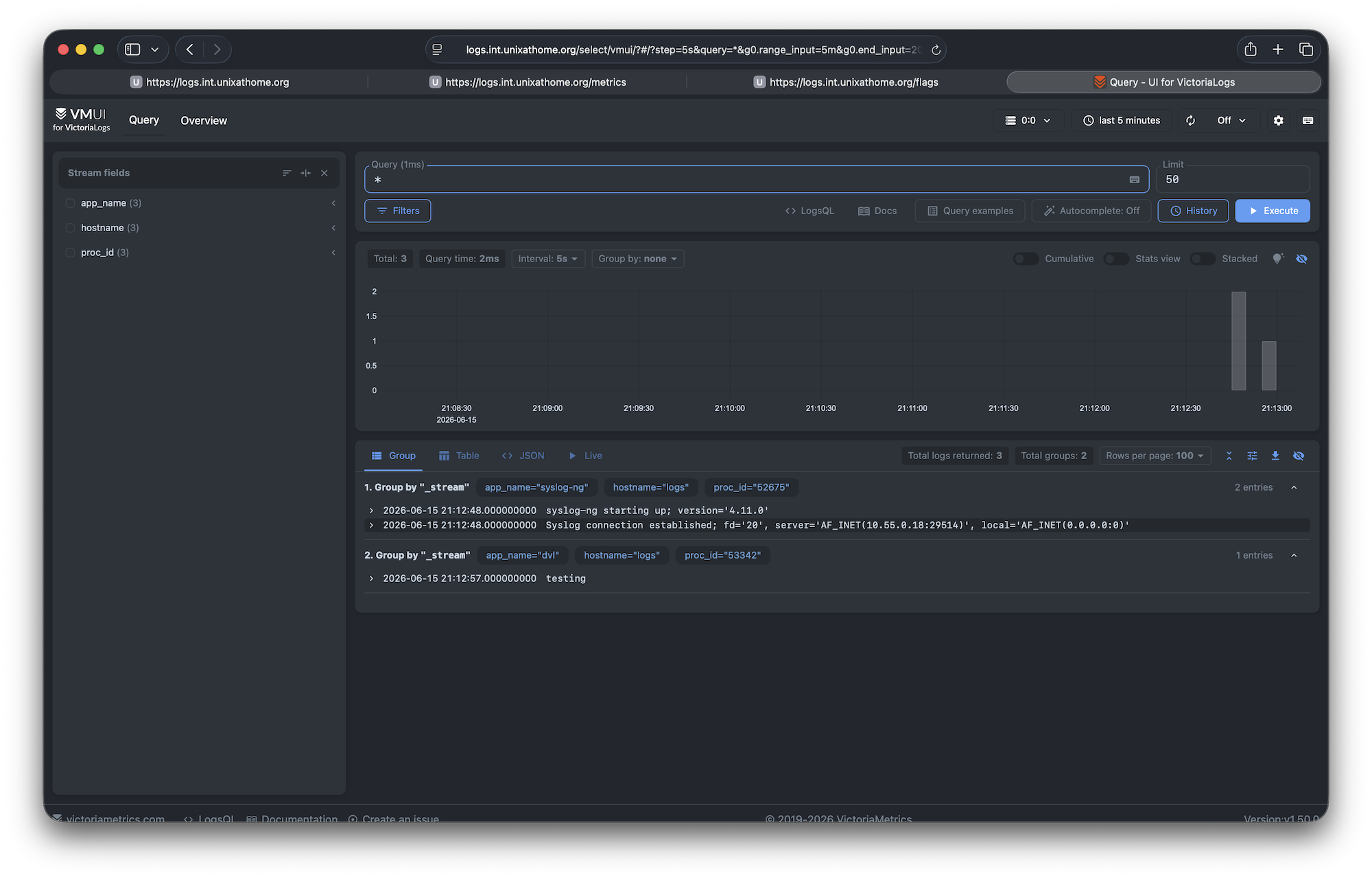
I restarted syslog_ng, ran a logger test and data started showing up. As shown here:
[I could not upload the screen shot I’ll try again later]
Log rotation
I also added /var/run/syslog-ng.pid to the end of each line in /etc/newsyslog.conf – I was seeing some permission issues on the logs. Time will tell if this change fixes that.


