On Nov 28, I rebooted r730-01 after an update, and it didn’t come back. At all.
I had inserted 2x 4TB SSDS a few days earlier. It seems they contained remnants of a zroot. The host was trying to boot from them. I couldn’t get the host to boot from the real zroot. It frustrated me.
I gave up and went to sleep later. The next morning, I moved those two drives into r730-04 and rebooted r730-01 – which recovered gracefully.
My goal now: reproduce the situation on r730-04 and see if I can resolve the problem from the console without removing the drives. And without booting a live boot image (e.g. thumbdrive).
In this post:
- FreeBSD 14.3
- mfsBSD 14.2
Does it boot?
No, it does not boot. I get this:
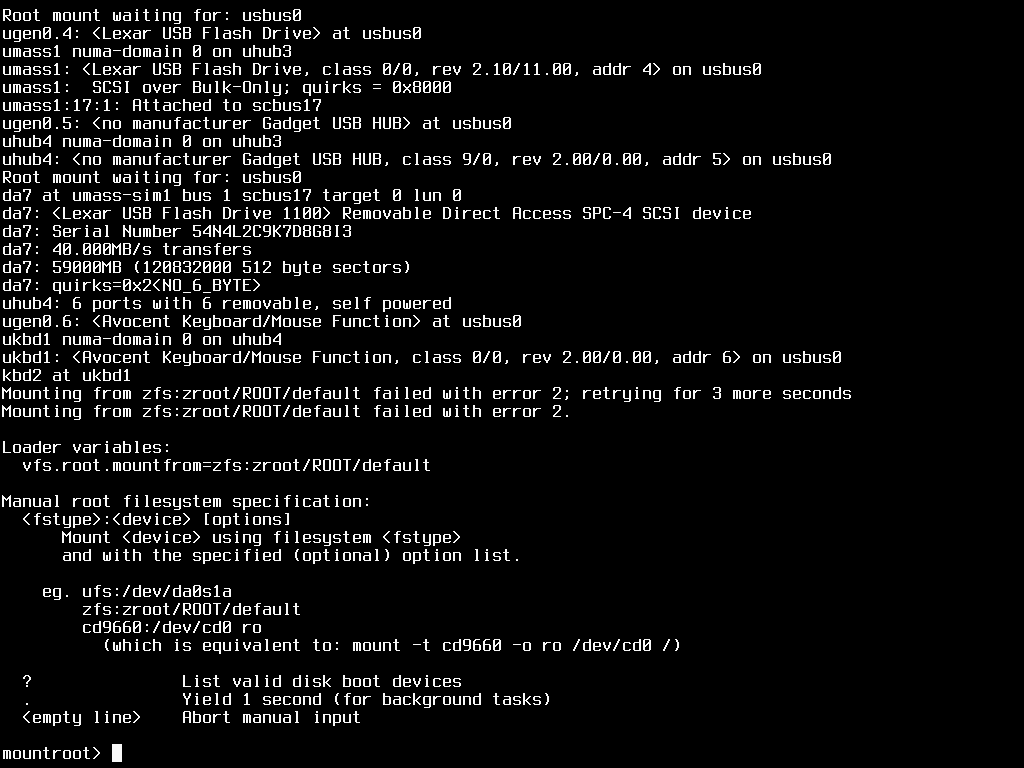
From here, I’m not sure what to do. My goal with this post: find a way to fix this without resorting to a live thumbdrive. That is, fix this from the console.
Is that possible?
What’s in the box?
When booting mfsBSD, I dropped into the loader prompted and entered this:
set hw.mfi.mrsas_enable="1"
boot
Then I ssh’d in as root (password is mfsroot).
From mfsBSD, I see this:
root@mfsbsd:~ # zpool import
   pool: zroot
     id: 17107398103472157640
  state: DEGRADED
status: One or more devices contains corrupted data.
 action: The pool can be imported despite missing or damaged devices.  The
	fault tolerance of the pool may be compromised if imported.
   see: https://openzfs.github.io/openzfs-docs/msg/ZFS-8000-4J
 config:

	zroot       DEGRADED
	  mirror-0  DEGRADED
	    da0p3   UNAVAIL  invalid label
	    da1p3   UNAVAIL  invalid label
	    da3p3   ONLINE

   pool: zroot_30G_drives
     id: 244204476102814311
  state: ONLINE
 action: The pool can be imported using its name or numeric identifier.
 config:

	zroot_30G_drives  ONLINE
	  mirror-0        ONLINE
	    da4p3         ONLINE
	    da5p3         ONLINE

   pool: data04
     id: 14613959245391720618
  state: ONLINE
 action: The pool can be imported using its name or numeric identifier.
 config:

	data04                           ONLINE
	  mirror-0                       ONLINE
	    diskid/DISK-S757NS0Y700758M  ONLINE
	    diskid/DISK-S757NS0Y700760R  ONLINE

   pool: zroot
     id: 16510343806874404582
  state: ONLINE
 action: The pool can be imported using its name or numeric identifier.
 config:

	zroot       ONLINE
	  mirror-0  ONLINE
	    da0p3   ONLINE
	    da1p3   ONLINE

   pool: zroot
     id: 16789754035394283994
  state: ONLINE
 action: The pool can be imported using its name or numeric identifier.
 config:

	zroot       ONLINE
	  mirror-0  ONLINE
	    ada0p3  ONLINE
	    ada1p3  ONLINE
root@mfsbsd:~ #
I know that last zroot, on ada0/1, is the one I want to boot from. I recognize the device names associated with the SATADOM devices attached directly to the m/b of the server.
root@mfsbsd:~ # grep ada0 /var/log/messages Dec 2 17:54:30 mfsbsd kernel: ada0 at ahcich10 bus 0 scbus13 target 0 lun 0 Dec 2 17:54:30 mfsbsd kernel: ada0:ACS-2 ATA SATA 3.x device Dec 2 17:54:30 mfsbsd kernel: ada0: Serial Number 20170718AA0000185541 Dec 2 17:54:30 mfsbsd kernel: ada0: 600.000MB/s transfers (SATA 3.x, UDMA6, PIO 1024bytes) Dec 2 17:54:30 mfsbsd kernel: ada0: Command Queueing enabled Dec 2 17:54:30 mfsbsd kernel: ada0: 118288MB (242255664 512 byte sectors) Dec 2 17:54:30 mfsbsd kernel: ses1: ada0,pass7 in 'Slot 04', SATA Slot: scbus13 target 0 root@mfsbsd:~ # grep ada1 /var/log/messages Dec 2 17:54:30 mfsbsd kernel: ada1 at ahcich11 bus 0 scbus14 target 0 lun 0 Dec 2 17:54:30 mfsbsd kernel: ada1: ACS-2 ATA SATA 3.x device Dec 2 17:54:30 mfsbsd kernel: ada1: Serial Number 20170718AA0000185552 Dec 2 17:54:30 mfsbsd kernel: ada1: 600.000MB/s transfers (SATA 3.x, UDMA6, PIO 1024bytes) Dec 2 17:54:30 mfsbsd kernel: ada1: Command Queueing enabled Dec 2 17:54:30 mfsbsd kernel: ada1: 118288MB (242255664 512 byte sectors) Dec 2 17:54:30 mfsbsd kernel: ses1: ada1,pass8 in 'Slot 05', SATA Slot: scbus14 target 0 root@mfsbsd:~ #
For the zpools shown above, here are the partitions:
line 1 – zroot I don’t want
This is all messed up. Why is da3 in there? Oh wait, perhaps brought in by device name instead of gpt label?
root@mfsbsd:~ # gpart show da0 da1 da3
=>       40  468862048  da0  GPT  (224G)
         40       1024    1  freebsd-boot  (512K)
       1064        984       - free -  (492K)
       2048    4194304    2  freebsd-swap  (2.0G)
    4196352  464664576    3  freebsd-zfs  (222G)
  468860928       1160       - free -  (580K)

=>       40  468862048  da1  GPT  (224G)
         40       1024    1  freebsd-boot  (512K)
       1064        984       - free -  (492K)
       2048    4194304    2  freebsd-swap  (2.0G)
    4196352  464664576    3  freebsd-zfs  (222G)
  468860928       1160       - free -  (580K)

=>        34  7814037101  da3  GPT  (3.6T)
          34    17311710       - free -  (8.3G)
    17311744  1936213384    3  freebsd-zfs  (923G)
  1953525128  5860512007       - free -  (2.7T)

root@mfsbsd:~ #
line 17 – zroot_30G_drives
This looks valid, but it’s not the zroot I want.d
root@mfsbsd:~ # gpart show da4 da5
=>      40  62533216  da4  GPT  (30G)
        40      2008       - free -  (1.0M)
      2048    409600    1  efi  (200M)
    411648  16777216    2  freebsd-swap  (8.0G)
  17188864  45344392    3  freebsd-zfs  (22G)

=>      40  62533216  da5  GPT  (30G)
        40      2008       - free -  (1.0M)
      2048    409600    1  efi  (200M)
    411648  16777216    2  freebsd-swap  (8.0G)
  17188864  45344392    3  freebsd-zfs  (22G)

root@mfsbsd:~ #
line 28 – data04
Now I need to convert diskid/DISK-S757NS0Y700758M to a device name. For that, I used glabel list | less
and searched fort that text. I found this:
Geom name: da3
Providers:
1. Name: diskid/DISK-S757NS0Y700758M
   Mediasize: 4000787030016 (3.6T)
And this:
Geom name: da2
Providers:
1. Name: diskid/DISK-S757NS0Y700760R
Which leads to this command:
root@mfsbsd:~ # gpart show da3 da2
=>        34  7814037101  da3  GPT  (3.6T)
          34    17311710       - free -  (8.3G)
    17311744  1936213384    3  freebsd-zfs  (923G)
  1953525128  5860512007       - free -  (2.7T)

gpart: No such geom: da2.
line 39- zroot (for da3/da2) – I don’t want this one
gpart show da0 da1
root@mfsbsd:~ # gpart show da0 da1
=>       40  468862048  da0  GPT  (224G)
         40       1024    1  freebsd-boot  (512K)
       1064        984       - free -  (492K)
       2048    4194304    2  freebsd-swap  (2.0G)
    4196352  464664576    3  freebsd-zfs  (222G)
  468860928       1160       - free -  (580K)

=>       40  468862048  da1  GPT  (224G)
         40       1024    1  freebsd-boot  (512K)
       1064        984       - free -  (492K)
       2048    4194304    2  freebsd-swap  (2.0G)
    4196352  464664576    3  freebsd-zfs  (222G)
  468860928       1160       - free -  (580K)
line 50 – zroot ada0/ada1 – THIS is the zroot I want to boot from
root@mfsbsd:~ # gpart show ada0 ada1
=>       40  242255584  ada0  GPT  (116G)
         40     532480     1  efi  (260M)
     532520       2008        - free -  (1.0M)
     534528   33554432     2  freebsd-swap  (16G)
   34088960  208164864     3  freebsd-zfs  (99G)
  242253824       1800        - free -  (900K)

=>       40  242255584  ada1  GPT  (116G)
         40     532480     1  efi  (260M)
     532520       2008        - free -  (1.0M)
     534528   33554432     2  freebsd-swap  (16G)
   34088960  208164864     3  freebsd-zfs  (99G)
  242253824       1800        - free -  (900K)


