I have a problem with a zpool. To be clear, this really isn’t a problem. I’m not aware of any I/O throttling etc. It is just something I would like to change.
[18:26 r720-02 dvl ~] % zpool status data01
  pool: data01
 state: ONLINE
status: One or more devices are configured to use a non-native block size.
	Expect reduced performance.
action: Replace affected devices with devices that support the
	configured block size, or migrate data to a properly configured
	pool.
  scan: scrub repaired 0B in 00:15:40 with 0 errors on Mon Dec  8 04:05:38 2025
config:

	NAME                         STATE     READ WRITE CKSUM
	data01                       ONLINE       0     0     0
	  mirror-0                   ONLINE       0     0     0
	    gpt/S59VNS0N809087J_S00  ONLINE       0     0     0  block size: 512B configured, 4096B native
	    gpt/S59VNJ0N631973D_S01  ONLINE       0     0     0  block size: 512B configured, 4096B native
	  mirror-1                   ONLINE       0     0     0
	    gpt/S5B3NDFN807383E_S02  ONLINE       0     0     0  block size: 512B configured, 4096B native
	    gpt/S5B3NDFN807386P_S03  ONLINE       0     0     0
  block size: 512B configured, 4096B native

errors: No known data errors
I point out that this problem was not detected when the zpool was created 5 years ago in Oct 2020. Perhaps this is a situation which ZFS has only recently started to report.
It was discussed on Mastodon and deciding that recreation was the only option.
The plan:
- copy everything off the zpool
- destroy the zpool
- create the zpool
- copy everything onto the zpool
Sounds easy!
In this post:
- FreeBSD 14.3
One more time, with a bit of detail
Let me repeat what I just said above, but with slightly more detail.
- zfs send the data01 zpool from r720-02 (in a data center in New York) to r730-01 (in a rack, in my basement)
- repeat that send | recv, getting any changes since that initial length copy
- destroy the zpool on r720-02
- create the zpool, making sure we have solved the issue
- copy everything back, using another send | recv
Of note:
- I will be allowing ssh via root for this purpose. This is not recommended, except in certain temporary circumstances, such as this.
- ssh will be tightly controlled, by ssh-key only
I’m not going into much detail as to how I’m doing that all.
Allowing root ssh, by key only
I’m setting the bar high here. If you don’t know how to do this, I suggest you don’t want to do this.
I created an ssh key on the sending host. It has a passphrase.
I added that public key to the root account on the receiving host. I enabled root ssh on the receiving host.
All that will be disabled and reversed after I have done this copy/restore. This is not something you should enable forever. It will come back to bite you later.
Creating the destination dataset
This is where we will send data.
root@r730-01:~ # zfs get all data04/r720-02
NAME            PROPERTY              VALUE                  SOURCE
data04/r720-02  type                  filesystem             -
data04/r720-02  creation              Thu Dec 11 18:15 2025  -
data04/r720-02  used                  205K                   -
data04/r720-02  available             17.3T                  -
data04/r720-02  referenced            205K                   -
data04/r720-02  compressratio         1.00x                  -
data04/r720-02  mounted               yes                    -
data04/r720-02  quota                 none                   default
data04/r720-02  reservation           none                   default
data04/r720-02  recordsize            128K                   inherited from data04
data04/r720-02  mountpoint            /data04/r720-02        default
data04/r720-02  sharenfs              off                    default
data04/r720-02  checksum              on                     default
data04/r720-02  compression           zstd                   inherited from data04
data04/r720-02  atime                 on                     default
data04/r720-02  devices               on                     default
data04/r720-02  exec                  on                     default
data04/r720-02  setuid                on                     default
data04/r720-02  readonly              off                    default
data04/r720-02  jailed                off                    default
data04/r720-02  snapdir               hidden                 default
data04/r720-02  aclmode               discard                default
data04/r720-02  aclinherit            restricted             default
data04/r720-02  createtxg             36211                  -
data04/r720-02  canmount              on                     default
data04/r720-02  xattr                 on                     default
data04/r720-02  copies                1                      default
data04/r720-02  version               5                      -
data04/r720-02  utf8only              off                    -
data04/r720-02  normalization         none                   -
data04/r720-02  casesensitivity       sensitive              -
data04/r720-02  vscan                 off                    default
data04/r720-02  nbmand                off                    default
data04/r720-02  sharesmb              off                    default
data04/r720-02  refquota              none                   default
data04/r720-02  refreservation        none                   default
data04/r720-02  guid                  8698413625513271311    -
data04/r720-02  primarycache          all                    default
data04/r720-02  secondarycache        all                    default
data04/r720-02  usedbysnapshots       0B                     -
data04/r720-02  usedbydataset         205K                   -
data04/r720-02  usedbychildren        0B                     -
data04/r720-02  usedbyrefreservation  0B                     -
data04/r720-02  logbias               latency                default
data04/r720-02  objsetid              3399                   -
data04/r720-02  dedup                 off                    default
data04/r720-02  mlslabel              none                   default
data04/r720-02  sync                  standard               default
data04/r720-02  dnodesize             legacy                 default
data04/r720-02  refcompressratio      1.00x                  -
data04/r720-02  written               205K                   -
data04/r720-02  logicalused           42.5K                  -
data04/r720-02  logicalreferenced     42.5K                  -
data04/r720-02  volmode               default                default
data04/r720-02  filesystem_limit      none                   default
data04/r720-02  snapshot_limit        none                   default
data04/r720-02  filesystem_count      none                   default
data04/r720-02  snapshot_count        none                   default
data04/r720-02  snapdev               hidden                 default
data04/r720-02  acltype               nfsv4                  default
data04/r720-02  context               none                   default
data04/r720-02  fscontext             none                   default
data04/r720-02  defcontext            none                   default
data04/r720-02  rootcontext           none                   default
data04/r720-02  relatime              on                     default
data04/r720-02  redundant_metadata    all                    default
data04/r720-02  overlay               on                     default
data04/r720-02  encryption            off                    default
data04/r720-02  keylocation           none                   default
data04/r720-02  keyformat             none                   default
data04/r720-02  pbkdf2iters           0                      default
data04/r720-02  special_small_blocks  0                      default
data04/r720-02  prefetch              all                    default
Starting the send
Here goes:
[root@r720-02:~] # zfs send -vR data01@send-to-r730-01-01 | mbuffer -s 128k -m 1G 2>/dev/null | ssh root@10.55.0.141 'mbuffer -s 128k -m 1G | zfs recv -duF data04/r720-02'
Two thoughts:
- syncoid is not ssh-agent aware from what I can tell
- I started this in a tmux session
How long?
Now I wait. How long? Let’s estimate.
[15:42 r720-02 dvl ~] % zpool list data01
NAME     SIZE  ALLOC   FREE  CKPOINT  EXPANDSZ   FRAG    CAP  DEDUP    HEALTH  ALTROOT
data01  1.81T   759G  1.07T        -         -    30%    40%  1.00x    ONLINE  -
So, 760G to send.
The transfer started at:
[15:42 r720-02 dvl ~] % ps auwwx | grep send
root    77687    1.1  0.0   28004   12324  2  S+   15:36        0:10.75 zfs send -vR data01@send-to-r730-01-01
dvl     81195    0.0  0.0   13836    2400  3  S+   15:43        0:00.00 grep send
15:36 – it is now 15:43 – so 7 minutes.
How much copied?
root@r730-01:~/.ssh # zfs list -r data04/r720-02
NAME                           USED  AVAIL  REFER  MOUNTPOINT
data04/r720-02                2.12G  17.3T   188K  /data04/r720-02
data04/r720-02/jails          2.12G  17.3T   290K  /jails
data04/r720-02/jails/perl540   541M  17.3T   526M  /jails/perl540
data04/r720-02/jails/proxy01   606M  17.3T   606M  /jails/proxy01
data04/r720-02/jails/svn      1.00G  17.3T   984M  /jails/svn
2.12G
Doing the math: 2.12 / 760 = 0.00278 or about 0.3%
0.00278 of X is 7 minutes.
X = 7 / 0.00278 = 2517.98 minutes = 42 hours
That’s how long it should take to get here. Should be done at 4:46 AM on Saturday morning (local time).
Saturday 18:22 UTC
Well, it ain’t done yet.
[18:22 r730-01 dvl ~] % zfs list data04/r720-02
NAME             USED  AVAIL  REFER  MOUNTPOINT
data04/r720-02   774G  16.5T   188K  /data04/r720-02
774G copied in.
And the copy is still going:
[18:24 r730-01 dvl ~] % ps auwwx | grep zfs
root        7    0.0  0.0       0   37904  -  DL   Tue17      176:19.35 [zfskern]
root    10582    0.0  0.0   14404    2984  -  Is   Fri15        0:00.00 sh -c mbuffer -s 128k -m 1G | zfs recv -duF data04/r720-02
root    10584    0.0  0.0   23132   10084  -  S    Fri15       11:13.68 zfs recv -duF data04/r720-02
dvl     20429    0.0  0.0   13836    2392  2  S+   18:24        0:00.00 grep zfs
I’ll check back later.
In the meantime…
I noticed this in recordsize, it’s rather small for the distfiles dataset, which is mostly large tarballs.
[18:24 r730-01 dvl ~] % zfs get -r -t filesystem recordsize data04/r720-02
NAME                                                                   PROPERTY    VALUE    SOURCE
data04/r720-02                                                         recordsize  128K     inherited from data04
data04/r720-02/backups                                                 recordsize  128K     inherited from data04
data04/r720-02/backups/rscyncer                                        recordsize  128K     inherited from data04
data04/r720-02/backups/rscyncer/backups                                recordsize  128K     inherited from data04
data04/r720-02/backups/rscyncer/backups/bacula-database                recordsize  128K     inherited from data04
data04/r720-02/freebsd_releases                                        recordsize  128K     inherited from data04
data04/r720-02/freshports                                              recordsize  128K     inherited from data04
data04/r720-02/freshports/ingress01                                    recordsize  128K     inherited from data04
data04/r720-02/freshports/ingress01/ports                              recordsize  128K     inherited from data04
data04/r720-02/freshports/ingress01/var                                recordsize  128K     inherited from data04
data04/r720-02/freshports/ingress01/var/db                             recordsize  128K     inherited from data04
data04/r720-02/freshports/ingress01/var/db/freshports                  recordsize  128K     inherited from data04
data04/r720-02/freshports/ingress01/var/db/freshports/cache            recordsize  128K     inherited from data04
data04/r720-02/freshports/ingress01/var/db/freshports/cache/html       recordsize  128K     inherited from data04
data04/r720-02/freshports/ingress01/var/db/freshports/cache/spooling   recordsize  128K     inherited from data04
data04/r720-02/freshports/ingress01/var/db/freshports/message-queues   recordsize  128K     inherited from data04
data04/r720-02/freshports/ingress01/var/db/freshports/repos            recordsize  128K     inherited from data04
data04/r720-02/freshports/ingress01/var/db/ingress                     recordsize  128K     inherited from data04
data04/r720-02/freshports/ingress01/var/db/ingress/message-queues      recordsize  128K     inherited from data04
data04/r720-02/freshports/ingress01/var/db/ingress/repos               recordsize  128K     inherited from data04
data04/r720-02/freshports/ingress01/var/db/ingress_svn                 recordsize  128K     inherited from data04
data04/r720-02/freshports/ingress01/var/db/ingress_svn/message_queues  recordsize  128K     inherited from data04
data04/r720-02/freshports/jailed                                       recordsize  128K     inherited from data04
data04/r720-02/freshports/jailed/ingress01                             recordsize  128K     inherited from data04
data04/r720-02/freshports/jailed/ingress01/distfiles                   recordsize  128K     inherited from data04
data04/r720-02/freshports/jailed/ingress01/jails                       recordsize  128K     inherited from data04
data04/r720-02/freshports/jailed/ingress01/jails/freshports            recordsize  128K     inherited from data04
data04/r720-02/freshports/jailed/ingress01/mkjail                      recordsize  128K     inherited from data04
data04/r720-02/freshports/jailed/ingress01/mkjail/14.3-RELEASE         recordsize  128K     inherited from data04
data04/r720-02/freshports/nginx01                                      recordsize  128K     inherited from data04
data04/r720-02/freshports/nginx01/var                                  recordsize  128K     inherited from data04
data04/r720-02/freshports/nginx01/var/db                               recordsize  128K     inherited from data04
data04/r720-02/freshports/nginx01/var/db/freshports                    recordsize  128K     inherited from data04
data04/r720-02/freshports/nginx01/var/db/freshports/cache              recordsize  128K     inherited from data04
data04/r720-02/freshports/nginx01/var/db/freshports/cache/categories   recordsize  128K     inherited from data04
data04/r720-02/freshports/nginx01/var/db/freshports/cache/commits      recordsize  128K     inherited from data04
data04/r720-02/freshports/nginx01/var/db/freshports/cache/daily        recordsize  128K     inherited from data04
data04/r720-02/freshports/nginx01/var/db/freshports/cache/general      recordsize  128K     inherited from data04
data04/r720-02/freshports/nginx01/var/db/freshports/cache/news         recordsize  128K     inherited from data04
data04/r720-02/freshports/nginx01/var/db/freshports/cache/packages     recordsize  128K     inherited from data04
data04/r720-02/freshports/nginx01/var/db/freshports/cache/pages        recordsize  128K     inherited from data04
data04/r720-02/freshports/nginx01/var/db/freshports/cache/ports        recordsize  128K     inherited from data04
data04/r720-02/freshports/nginx01/var/db/freshports/cache/spooling     recordsize  128K     inherited from data04
data04/r720-02/jails                                                   recordsize  128K     inherited from data04
data04/r720-02/jails/bw                                                recordsize  128K     inherited from data04
data04/r720-02/jails/ingress01                                         recordsize  128K     inherited from data04
data04/r720-02/jails/nginx01                                           recordsize  128K     inherited from data04
data04/r720-02/jails/ns3                                               recordsize  128K     inherited from data04
data04/r720-02/jails/perl540                                           recordsize  128K     inherited from data04
data04/r720-02/jails/pg01                                              recordsize  128K     inherited from data04
data04/r720-02/jails/proxy01                                           recordsize  128K     inherited from data04
data04/r720-02/jails/svn                                               recordsize  128K     inherited from data04
data04/r720-02/mkjail                                                  recordsize  128K     inherited from data04
data04/r720-02/mkjail/14.1-RELEASE                                     recordsize  128K     inherited from data04
data04/r720-02/mkjail/14.2-RELEASE                                     recordsize  128K     inherited from data04
data04/r720-02/mkjail/14.3-RELEASE                                     recordsize  128K     inherited from data04
data04/r720-02/pg01                                                    recordsize  8K       received
data04/r720-02/pg01/dan                                                recordsize  8K       inherited from data04/r720-02/pg01
data04/r720-02/pg01/postgres                                           recordsize  8K       received
data04/r720-02/reserved                                                recordsize  128K     inherited from data04
Let’s fix that on the copy, so when we copy it back, it’s what we want.
I’m going to do some looking, without much to support my decisions. I’m guessing.
We have 17k files:
[18:30 r720-02 dvl /jails/freshports/usr/ports/distfiles] % find . -type f | wc -l
   16885
The biggest out here, seem to be about 2GB:
[18:29 r720-02 dvl /jails/freshports/usr/ports/distfiles] % ls -lSh | head
total 305190300
-rw-r--r--    1 root wheel  2.1G 2024.03.20 12:03 adobe-fonts-source-han-sans-2.001R_GH0.tar.gz
-rw-r--r--    1 root wheel  1.9G 2022.12.23 03:49 adobe-fonts-source-han-sans-2.000R_GH0.tar.gz
-rw-r--r--    1 root wheel  1.8G 2022.12.23 03:54 adobe-fonts-source-han-serif-1.001R_GH0.tar.gz
-rw-r--r--    1 root wheel  1.1G 2023.11.13 04:04 alienarena-alienarena-7.71.6_GH0.tar.gz
-rw-r--r--    1 root wheel  1.1G 2024.08.12 08:03 pycharm-professional-2024.2.tar.gz
-rw-r--r--    1 root wheel  1.1G 2025.02.27 16:50 pycharm-professional-2024.3.4.tar.gz
-rw-r--r--    1 root wheel  1.1G 2025.02.13 16:58 pycharm-professional-2024.3.3.tar.gz
-rw-r--r--    1 root wheel  1.0G 2024.09.26 15:20 pycharm-professional-2024.2.3.tar.gz
-rw-r--r--    1 root wheel  1.0G 2024.09.19 17:33 pycharm-professional-2024.2.2.tar.gz
So I’m going to bump the recordsize to 1M.
[18:26 r730-01 dvl ~] % sudo zfs set recordsize=1M data04/r720-02/freshports/jailed/ingress01/distfiles
[18:34 r730-01 dvl ~] %
With that, I’m off to the Reindeer Romp.
Sunday morning
The first copy is finished.
...
in @ 8661 kiB/s, out @ 8661 kiB/s,  985 GiB total, buffer   0% full21:04:53    986G   data01/backups/rscyncer/backups/bacula-database@send-to-r730-01-01
in @ 9547 kiB/s, out @ 9547 kiB/s,  985 GiB total, buffer   0% full21:04:54    986G   data01/backups/rscyncer/backups/bacula-database@send-to-r730-01-01
TIME        SENT   SNAPSHOT data01/backups/rscyncer/backups/Bacula@send-to-r730-01-01
in @ 3564 kiB/s, out @ 3564 kiB/s,  986 GiB total, buffer   0% full
summary:  986 GiByte in 29h 29min 51.4sec - average of 9740 kiB/s
in @ 6125 kiB/s, out @ 6125 kiB/s,  986 GiB total, buffer   0% full
summary:  986 GiByte in 29h 29min 51.3sec - average of 9740 kiB/s
The zpool looks as expected:
% zfs list data04/r720-02
NAME             USED  AVAIL  REFER  MOUNTPOINT
data04/r720-02   803G  16.5T   188K  /data04/r720-02
Initially, I thought it was a little bigger than the source, but:
[root@r720-02:~] # zfs list data01
NAME     USED  AVAIL  REFER  MOUNTPOINT
data01   926G   872G    23K  /data01
No, it’s slightly smaller. As I would hope, with the change from lz4 to zstd for compression.
An incremental send
Here, I do another snapshot:
[root@r720-02:~] # zfs snapshot -r data01@send-to-r730-01-02
[root@r720-02:~] #
And another send, this time, an incremental. Compared to the previous command (above, I’m adding the -I parameter and specifying a second snapshot name (data01@send-to-r730-01-02, as just taken above). This says: send the diff between these two snapshots…
[root@r720-02:~] # zfs send -vRI data01@send-to-r730-01-01 data01@send-to-r730-01-02 | mbuffer -s 128k -m 1G 2>/dev/null | ssh root@10.55.0.141 'mbuffer -s 128k -m 1G | zfs recv -duF data04/r720-02'
Now waiting… it’s going on 2.5 hours…
control-T tells me it’s sent 79.3G so far:
in @ 12.2 MiB/s, out @ 12.2 MiB/s, 78.2 GiB total, buffer   0% full17:40:18   79.2G   data01/backups/rscyncer/backups/bacula-database@send-to-r730-01-02
in @ 8396 kiB/s, out @ 8396 kiB/s, 78.3 GiB total, buffer   0% full
load: 0.85  cmd: ssh 34552 [running] 8963.27r 553.67u 1437.10s 22% 20936k
17:40:18   79.3G   data01/backups/rscyncer/backups/bacula-database@send-to-r730-01-02
in @ 11.0 MiB/s, out @ 11.0 MiB/s, 78.3 GiB total, buffer   0% full17:40:19   79.3G   data01/backups/rscyncer/backups/bacula-database@send-to-r730-01-02
in @ 9537 kiB/s, out @ 9286 kiB/s, 78.3 GiB total, buffer   0% full17:40:20   79.3G   data01/backups/rscyncer/backups/bacula-database@send-to-r730-01-02
in @ 5561 kiB/s, out @ 5561 kiB/s, 78.3 GiB total, buffer   0% full17:40:21   79.3G   data01/backups/rscyncer/backups/bacula-database@send-to-r730-01-02
in @ 7101 kiB/s, out @ 7101 kiB/s, 78.3 GiB total, buffer   0% full17:40:22   79.3G   data01/backups/rscyncer/backups/bacula-database@send-to-r730-01-02
in @ 8730 kiB/s, out @ 8730 kiB/s, 78.3 GiB total, buffer   0% full17:40:23   79.3G   data01/backups/rscyncer/backups/bacula-database@send-to-r730-01-02
in @ 8182 kiB/s, out @ 8182 kiB/s, 78.3 GiB total, buffer 100% full17:40:24   79.3G   data01/backups/rscyncer/backups/bacula-database@send-to-r730-01-02
It’s now 20:24 UTC and we’re done that one:
in @ 10.3 MiB/s, out @ 10.3 MiB/s,  169 GiB total, buffer   0% fullTIME        SENT   SNAPSHOT data01/backups/rscyncer/backups/Bacula@send-to-r730-01-02
in @ 10.8 MiB/s, out @ 10.8 MiB/s,  170 GiB total, buffer   0% full
summary:  170 GiByte in 5h 13min 09.2sec - average of 9488 kiB/s
in @ 9672 kiB/s, out @ 8399 kiB/s,  170 GiB total, buffer   0% full
summary:  170 GiByte in 5h 13min 09.3sec - average of 9487 kiB/s
I’m going to do one more.
[root@r720-02:~] # zfs snapshot -r data01@send-to-r730-01-03
[root@r720-02:~] # zfs send -vRI data01@send-to-r730-01-02 data01@send-to-r730-01-03 | mbuffer -s 128k -m 1G 2>/dev/null | ssh root@10.55.0.141 'mbuffer -s 128k -m 1G | zfs recv -duF data04/r720-02'
Let’s see how long this one takes.
Well, not long at all:
TIME        SENT   SNAPSHOT data01/backups/rscyncer/backups/bacula-database@send-to-r730-01-03
TIME        SENT   SNAPSHOT data01/backups/rscyncer/backups/Bacula@send-to-r730-01-03
in @ 10.6 MiB/s, out @ 10.6 MiB/s, 1080 MiB total, buffer   0% full
summary: 1083 MiByte in  2min 02.9sec - average of 9022 kiB/s
in @  0.0 kiB/s, out @  0.0 kiB/s, 1083 MiB total, buffer   0% full
summary: 1083 MiByte in  2min 05.7sec - average of 8820 kiB/s
Just 2 minutes.
OK, time to shutdown the jails, do a final send, and then destroy/recreate the zpool.
Final copy
Let’s shutdown the jails, and send a last copy over.
[root@r720-02:~] # sudo service jail stop
[root@r720-02:~] # zfs snapshot -r data01@send-to-r730-01-04
[root@r720-02:~] # zfs send -vRI data01@send-to-r730-01-03 data01@send-to-r730-01-04 | mbuffer -s 128k -m 1G 2>/dev/null | ssh root@10.55.0.141 'mbuffer -s 128k -m 1G | zfs recv -duF data04/r720-02'

...

TIME        SENT   SNAPSHOT data01/backups/rscyncer/backups/bacula-database@send-to-r730-01-04
TIME        SENT   SNAPSHOT data01/backups/rscyncer/backups/Bacula@send-to-r730-01-04
in @  0.0 kiB/s, out @ 12.4 MiB/s,  105 MiB total, buffer   0% fullsummary:  105 MiByte in 13.7sec - average of 7867 kiB/s
in @  0.0 kiB/s, out @  755 kiB/s,  105 MiB total, buffer   0% full
summary:  105 MiByte in 16.3sec - average of 6627 kiB/s
Final size check
This is the original:
[root@r720-02:~] # zpool list data01
NAME     SIZE  ALLOC   FREE  CKPOINT  EXPANDSZ   FRAG    CAP  DEDUP    HEALTH  ALTROOT
data01  1.81T   831G  1.00T        -         -    31%    44%  1.00x    ONLINE  -
This is the copy:
[14:10 r730-01 dvl ~] % zfs list data04/r720-02
NAME             USED  AVAIL  REFER  MOUNTPOINT
data04/r720-02   859G  16.4T   188K  /data04/r720-02
And one more:
[root@r720-02:~] # zfs list -r data01 | wc -l
      62
[root@r720-02:~] #
Compared to:
[20:38 r730-01 dvl ~] % zfs list -r data04/r720-02 | wc -l
      62
[20:38 r730-01 dvl ~] %
What next?
Next, I’d like to export the zpool, just so I know it’s not being used by anything. Stuff is still mounted and, in my mind, writable. Let’s be sure.
Please watch as I struggle to umount all the stuff.
[root@r720-02:~] # zpool export data01
cannot unmount '/jails/proxy01': pool or dataset is busy

[root@r720-02:~] # mount | grep /jails/proxy01
data01/jails/proxy01 on /jails/proxy01 (zfs, local, nfsv4acls)

[root@r720-02:~] # zfs umount data01/jails/proxy01
cannot unmount '/jails/proxy01': pool or dataset is busy


[root@r720-02:~] # zpool export data01
cannot unmount '/jails/freshports/usr/ports/distfiles': pool or dataset is busy

[root@r720-02:~] # zfs umount -f data01/freshports/jailed/ingress01/distfiles

[root@r720-02:~] # zpool export data01
[root@r720-02:~] #
There. It’s out. One more snapshot, after importing without mounting:
[root@r720-02:~] # zpool import -N data01
[root@r720-02:~] # zfs snapshot -r data01@send-to-r730-01-05
[root@r720-02:~] # zfs send -vRI data01@send-to-r730-01-04 data01@send-to-r730-01-05 | mbuffer -s 128k -m 1G 2>/dev/null | ssh root@10.55.0.141 'mbuffer -s 128k -m 1G | zfs recv -duF data04/r720-02'
...
TIME        SENT   SNAPSHOT data01/backups/rscyncer/backups/Bacula@send-to-r730-01-05

summary:  702 kiByte in  7.7sec - average of 90.9 kiB/s
in @  0.0 kiB/s, out @  251 kiB/s,  640 kiB total, buffer   0% full
summary:  702 kiByte in 13.2sec - average of 53.1 kiB/s
There, now I’m satisfied. Time to destroy.
[root@r720-02:~] # zpool destroy data01
[root@r720-02:~] #
Reallocating the drives
I want to reallocate the partitions on those drives.
[root@r720-02:~] # gpart show -l
=>       40  234441568  ada0  GPT  (112G)
         40       1024     1  gptboot0  (512K)
       1064        984        - free -  (492K)
       2048    4194304     2  swap0  (2.0G)
    4196352  230244352     3  zfs0  (110G)
  234440704        904        - free -  (452K)

=>       40  234441568  ada1  GPT  (112G)
         40       1024     1  gptboot1  (512K)
       1064        984        - free -  (492K)
       2048    4194304     2  swap1  (2.0G)
    4196352  230244352     3  zfs1  (110G)
  234440704        904        - free -  (452K)

=>        40  1953525088  da0  GPT  (932G)
          40  1953520000    1  S59VNS0N809087J_S00  (932G)
  1953520040        5088       - free -  (2.5M)

=>        40  1953525088  da1  GPT  (932G)
          40  1953520000    1  S59VNJ0N631973D_S01  (932G)
  1953520040        5088       - free -  (2.5M)

=>        40  1953525088  da2  GPT  (932G)
          40  1953520000    1  S5B3NDFN807383E_S02  (932G)
  1953520040        5088       - free -  (2.5M)

=>        40  1953525088  da3  GPT  (932G)
          40  1953520000    1  S5B3NDFN807386P_S03  (932G)
  1953520040        5088       - free -  (2.5M)

[root@r720-02:~] #
It’s da0, da1, da2, and da3.
Let’s see if I can do this without repeating the original mistakes.
Destroy the old partitions:
[root@r720-02:~] # gpart destroy -F da0
da0 destroyed
[root@r720-02:~] # gpart destroy -F da1
da1 destroyed
[root@r720-02:~] # gpart destroy -F da2
da2 destroyed
[root@r720-02:~] # gpart destroy -F da3
da3 destroyed
[root@r720-02:~] #
One of my favorite scripts. Notice how I use sudo, even when not needed.
[root@r720-02:~] # echo "da0 da1 da2 da3" | xargs -n 1 -I % sudo gpart create -s gpt %
da0 created
da1 created
da2 created
da3 created
And now the partitions.
[root@r720-02:~] # sudo gpart add -a 4K -i 1 -t freebsd-zfs -s 1953520000 -l S59VNS0N809087J_S00 da0
da0p1 added
[root@r720-02:~] # sudo gpart add -a 4K -i 1 -t freebsd-zfs -s 1953520000 -l S59VNJ0N631973D_S01 da1
da1p1 added
[root@r720-02:~] # sudo gpart add -a 4K -i 1 -t freebsd-zfs -s 1953520000 -l S5B3NDFN807383E_S02 da2
da2p1 added
[root@r720-02:~] # gpart add -a 4K -i 1 -t freebsd-zfs -s 1953520000 -l S5B3NDFN807386P_S03 da3
da3p1 added
What do we have?
[root@r720-02:~] # gpart show -l da0 da1 da2 da3
=>        40  1953525088  da0  GPT  (932G)
          40  1953520000    1  S59VNS0N809087J_S00  (932G)
  1953520040        5088       - free -  (2.5M)

=>        40  1953525088  da1  GPT  (932G)
          40  1953520000    1  S59VNJ0N631973D_S01  (932G)
  1953520040        5088       - free -  (2.5M)

=>        40  1953525088  da2  GPT  (932G)
          40  1953520000    1  S5B3NDFN807383E_S02  (932G)
  1953520040        5088       - free -  (2.5M)

=>        40  1953525088  da3  GPT  (932G)
          40  1953520000    1  S5B3NDFN807386P_S03  (932G)
  1953520040        5088       - free -  (2.5M)
[root@r720-02:~] #
zpool creation
Let’s try this (taken from Creating a 4 drive ZFS zpool: stripe over mirrors:
[root@r720-02:~] # timtime zpool create data01 \
mirror /dev/gpt/S59VNS0N809087J_S00 /dev/gpt/S59VNJ0N631973D_S01 \
mirror /dev/gpt/S5B3NDFN807383E_S02 /dev/gpt/S5B3NDFN807386P_S03

real    0m0.464s
user    0m0.011s
sys     0m0.048s

[root@r720-02:~] # zpool status data01
  pool: data01
 state: ONLINE
config:

        NAME                         STATE     READ WRITE CKSUM
        data01                       ONLINE       0     0     0
          mirror-0                   ONLINE       0     0     0
            gpt/S59VNS0N809087J_S00  ONLINE       0     0     0
            gpt/S59VNJ0N631973D_S01  ONLINE       0     0     0
          mirror-1                   ONLINE       0     0     0
            gpt/S5B3NDFN807383E_S02  ONLINE       0     0     0
            gpt/S5B3NDFN807386P_S03  ONLINE       0     0     0

errors: No known data errors
[root@r720-02:~] #
So tell me why this zpool doesn’t have the same problem? What’s the difference between back then and now?
Pulling the data back
This I wasn’t sure about, but I made it up, and it seems to work just fine.
[root@r720-02:~] # ssh root@10.55.0.141 'zfs send -vR data04/r720-02@send-to-r730-01-04 | mbuffer -s 128k -m 1G 2>/dev/null ' | mbuffer -s 128k -m 1G | zfs recv -duF data01
To be fair, I just reconstructed that command from memory and ps auwwwx | grep zfs. It’s already scrolled and gone in my tmux session.
Sounds like I need to come back in 29h 29min.
2025-12-15 – time for traffic graphs
I just updated librenms at home, so let’s look at a graph. This is r720-02 traffic:
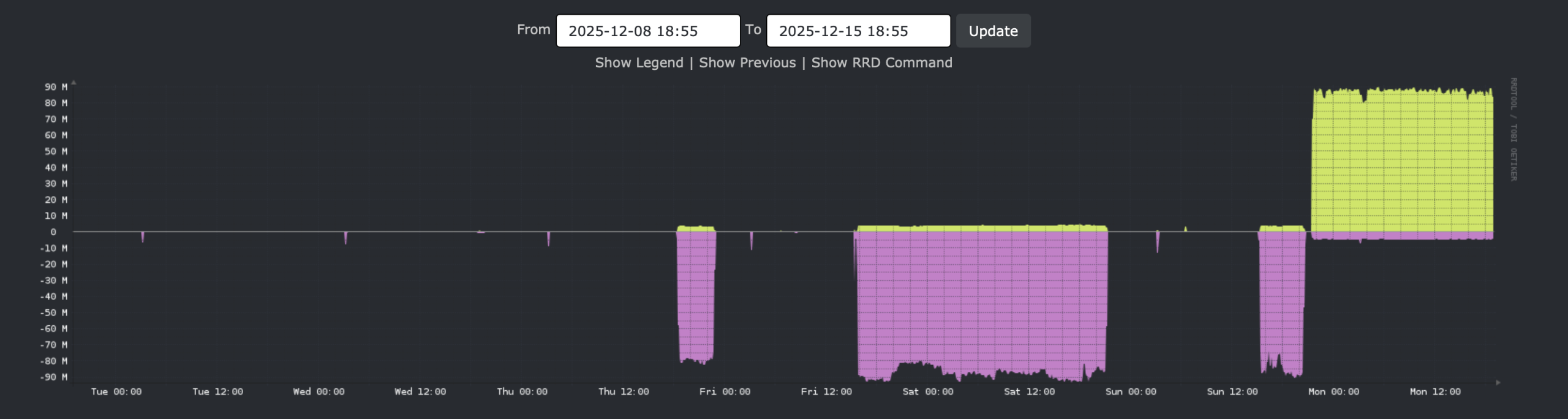
The stuff below the line: data leaving the host towards r730-01.
Above the line, data arriving from r730-01.
This graph is not specific to r730-01, but this host, being on standby, does very little other traffic.
Later that same day, I look at this:
[22:21 r720-02 root ~] # date
Mon Dec 15 22:21:53 UTC 2025

[22:21 r720-02 root ~] # zpool list data01
NAME     SIZE  ALLOC   FREE  CKPOINT  EXPANDSZ   FRAG    CAP  DEDUP    HEALTH  ALTROOT
data01  1.81T   436G  1.39T        -         -     0%    23%  1.00x    ONLINE  -
So about 50% over.
The tmux session looks like this:
in @ 14.1 MiB/s, out @ 14.1 MiB/s,  811 GiB total, buffer   0% full22:21:40    812G   data04/r720-02/freshports/jailed/ingress01/distfiles@all-distfiles
in @ 11.0 MiB/s, out @ 11.0 MiB/s,  811 GiB total, buffer   0% full22:21:41    812G   data04/r720-02/freshports/jailed/ingress01/distfiles@all-distfiles
in @ 8902 kiB/s, out @ 8902 kiB/s,  811 GiB total, buffer   0% full22:21:42    812G   data04/r720-02/freshports/jailed/ingress01/distfiles@all-distfiles
in @ 9138 kiB/s, out @ 9138 kiB/s,  811 GiB total, buffer   0% full
Time for the book club party. I’ll check back on Tuesday.
It’s done
From what I can tell, the copy is done:
[7:55 pro05 dvl ~] % r720-02
[12:55 r720-02 dvl ~] % zpool list data01
NAME     SIZE  ALLOC   FREE  CKPOINT  EXPANDSZ   FRAG    CAP  DEDUP    HEALTH  ALTROOT
data01  1.81T   777G  1.05T        -         -     0%    41%  1.00x    ONLINE  -

[12:55 r720-02 dvl ~] % ps auwwx | grep zfs
root        6    0.0  0.0     0  7280  -  DL   28Nov25     99:20.04 [zfskern]
dvl     13193    0.0  0.0 13836  2096  4  S+   12:55        0:00.00 grep zfs
[12:55 r720-02 dvl ~] %
Checking in on the tmux session, I found:
...
in @ 8180 kiB/s, out @ 8180 kiB/s, 1154 GiB total, buffer   0% full09:01:22   1.13T   data04/r720-02/freshports/ingress01/ports@send-to-r730-01-03
in @ 11.0 MiB/s, out @ 11.0 MiB/s, 1154 GiB total, buffer   0% full09:01:23   1.13T   data04/r720-02/freshports/ingress01/ports@send-to-r730-01-03
in @ 8912 kiB/s, out @ 8912 kiB/s, 1154 GiB total, buffer   0% full09:01:24   1.13T   data04/r720-02/freshports/ingress01/ports@send-to-r730-01-03
in @ 4810 kiB/s, out @ 4810 kiB/s, 1154 GiB total, buffer   0% fullTIME        SENT   SNAPSHOT data04/r720-02/freshports/ingress01/ports@send-to-r730-01-04
in @ 8180 kiB/s, out @ 8421 kiB/s, 1154 GiB total, buffer   0% full09:01:26   1.13T   data04/r720-02/freshports/ingress01/ports@send-to-r730-01-04
in @  9.9 MiB/s, out @  9.9 MiB/s, 1155 GiB total, buffer   0% full
summary: 1155 GiByte in 35h 41min 22.9sec - average of 9427 kiB/s
There, copied back. Initially I thought the copy back took several hours longer. Then I recalled: the initial send took 29 hours, then a copy more sends were done. I suspect they are close in time.
Some quick validation
[13:05 r730-01 dvl ~] % zfs list -r data04/r720-02 | wc -l
      62
[13:05 r730-01 dvl ~] % zfs list -r -t snapshot data04/r720-02 | wc -l
    1140
[13:06 r720-02 root ~] # zfs list -r data01 | wc -l
      63
[13:07 r720-02 root ~] # zfs list -r -t snapshot data01 | wc -l
    1079
So… that’s unexpected. Mostly, the number the filesystems is concerning. Let’s check.
[13:06 r720-02 root ~] # zfs list -r data01
NAME                                                                    USED  AVAIL  REFER  MOUNTPOINT
data01                                                                  868G   930G    96K  /data01
data01/r720-02                                                          868G   930G    88K  /data01/r720-02
data01/r720-02/backups                                                  145G   930G    96K  none
data01/r720-02/backups/rscyncer                                         145G   930G    96K  none
data01/r720-02/backups/rscyncer/backups                                 145G   930G   112K  /home/rsyncer/backups
data01/r720-02/backups/rscyncer/backups/Bacula                         1.78M   930G  1.50M  /home/rsyncer/backups/Bacula
data01/r720-02/backups/rscyncer/backups/bacula-database                 145G   930G  72.7G  /home/rsyncer/backups/bacula-database
data01/r720-02/freebsd_releases                                         468M   930G   468M  /var/db/mkjail
data01/r720-02/freshports                                               453G   930G    88K  none
data01/r720-02/freshports/ingress01                                    2.89G   930G    96K  none
data01/r720-02/freshports/ingress01/ports                              2.88G   930G  2.53G  /jails/ingress01/jails/freshports/usr/ports
data01/r720-02/freshports/ingress01/var                                1.22M   930G    96K  none
data01/r720-02/freshports/ingress01/var/db                             1.12M   930G    96K  none
data01/r720-02/freshports/ingress01/var/db/freshports                   576K   930G    96K  none
data01/r720-02/freshports/ingress01/var/db/freshports/cache             288K   930G    96K  none
data01/r720-02/freshports/ingress01/var/db/freshports/cache/html         96K   930G    96K  none
data01/r720-02/freshports/ingress01/var/db/freshports/cache/spooling     96K   930G    96K  none
data01/r720-02/freshports/ingress01/var/db/freshports/message-queues     96K   930G    96K  none
data01/r720-02/freshports/ingress01/var/db/freshports/repos              96K   930G    96K  none
data01/r720-02/freshports/ingress01/var/db/ingress                      288K   930G    96K  none
data01/r720-02/freshports/ingress01/var/db/ingress/message-queues        96K   930G    96K  none
data01/r720-02/freshports/ingress01/var/db/ingress/repos                 96K   930G    96K  none
data01/r720-02/freshports/ingress01/var/db/ingress_svn                  192K   930G    96K  none
data01/r720-02/freshports/ingress01/var/db/ingress_svn/message_queues    96K   930G    96K  none
data01/r720-02/freshports/jailed                                        451G   930G    96K  none
data01/r720-02/freshports/jailed/ingress01                              451G   930G    96K  none
data01/r720-02/freshports/jailed/ingress01/distfiles                    449G   930G   449G  /jails/freshports/usr/ports/distfiles
data01/r720-02/freshports/jailed/ingress01/jails                        462M   930G    96K  /jails
data01/r720-02/freshports/jailed/ingress01/jails/freshports             462M   930G   460M  /jails/freshports
data01/r720-02/freshports/jailed/ingress01/mkjail                      1.32G   930G   468M  /var/db/mkjail
data01/r720-02/freshports/jailed/ingress01/mkjail/14.3-RELEASE          880M   930G   868M  /var/db/mkjail/14.3-RELEASE
data01/r720-02/freshports/nginx01                                      2.25M   930G    96K  none
data01/r720-02/freshports/nginx01/var                                  2.16M   930G    96K  none
data01/r720-02/freshports/nginx01/var/db                               2.06M   930G    96K  none
data01/r720-02/freshports/nginx01/var/db/freshports                    1.97M   930G    96K  none
data01/r720-02/freshports/nginx01/var/db/freshports/cache              1.88M   930G    96K  /var/db/freshports/cache
data01/r720-02/freshports/nginx01/var/db/freshports/cache/categories     96K   930G    96K  /var/db/freshports/cache/categories
data01/r720-02/freshports/nginx01/var/db/freshports/cache/commits        96K   930G    96K  /var/db/freshports/cache/commits
data01/r720-02/freshports/nginx01/var/db/freshports/cache/daily          96K   930G    96K  /var/db/freshports/cache/daily
data01/r720-02/freshports/nginx01/var/db/freshports/cache/general        96K   930G    96K  /var/db/freshports/cache/general
data01/r720-02/freshports/nginx01/var/db/freshports/cache/news          288K   930G    96K  /var/db/freshports/cache/news
data01/r720-02/freshports/nginx01/var/db/freshports/cache/packages      264K   930G   128K  /var/db/freshports/cache/packages
data01/r720-02/freshports/nginx01/var/db/freshports/cache/pages          96K   930G    96K  /var/db/freshports/cache/pages
data01/r720-02/freshports/nginx01/var/db/freshports/cache/ports         432K   930G   232K  /var/db/freshports/cache/ports
data01/r720-02/freshports/nginx01/var/db/freshports/cache/spooling      360K   930G   120K  /var/db/freshports/cache/spooling
data01/r720-02/jails                                                    147G   930G   136K  /jails
data01/r720-02/jails/bw                                                3.11G   930G  1.58G  /jails/bw
data01/r720-02/jails/ingress01                                         62.2G   930G  15.9G  /jails/ingress01
data01/r720-02/jails/nginx01                                           8.45G   930G  4.23G  /jails/nginx01
data01/r720-02/jails/ns3                                               7.72G   930G  3.16G  /jails/ns3
data01/r720-02/jails/perl540                                            555M   930G   548M  /jails/perl540
data01/r720-02/jails/pg01                                              59.6G   930G  8.26G  /jails/pg01
data01/r720-02/jails/proxy01                                           3.90G   930G  2.55G  /jails/proxy01
data01/r720-02/jails/svn                                                970M   930G   951M  /jails/svn
data01/r720-02/mkjail                                                  2.56G   930G    96K  /mkjail
data01/r720-02/mkjail/14.1-RELEASE                                      874M   930G   862M  /mkjail/14.1-RELEASE
data01/r720-02/mkjail/14.2-RELEASE                                      868M   930G   856M  /mkjail/14.2-RELEASE
data01/r720-02/mkjail/14.3-RELEASE                                      880M   930G   868M  /mkjail/14.3-RELEASE
data01/r720-02/pg01                                                    28.6G   930G    96K  none
data01/r720-02/pg01/dan                                                  96K   930G    96K  /jails/pg01/usr/home/dan/dump
data01/r720-02/pg01/postgres                                           28.6G   930G  27.8G  /jails/pg01/var/db/postgres
data01/r720-02/reserved                                                91.0G  1021G    96K  /data01/r720-02/reserved
Oh, that’s why. Everything is has one-more-element in the path. I am sure there is on option when sending to avoid this situation.
Each of these locations need to be bumped up by one.
[13:10 r720-02 root ~] # zfs list -d 1 data01/r720-02
NAME                              USED  AVAIL  REFER  MOUNTPOINT
data01/r720-02                    868G   930G    88K  /data01/r720-02
data01/r720-02/backups            145G   930G    96K  none
data01/r720-02/freebsd_releases   468M   930G   468M  /var/db/mkjail
data01/r720-02/freshports         453G   930G    88K  none
data01/r720-02/jails              147G   930G   136K  /jails
data01/r720-02/mkjail            2.56G   930G    96K  /mkjail
data01/r720-02/pg01              28.6G   930G    96K  none
data01/r720-02/reserved          91.0G  1021G    96K  /data01/r720-02/reserved
By that, I mean rename data01/r720-02/backups to data01/backups, and so on.
Renaming
There are only 7 renames to be done, but I want to show how I would code this:
[13:11 r720-02 root ~] # zfs list -o name -H -d 1 data01/r720-02
data01/r720-02
data01/r720-02/backups
data01/r720-02/freebsd_releases
data01/r720-02/freshports
data01/r720-02/jails
data01/r720-02/mkjail
data01/r720-02/pg01
data01/r720-02/reserved
That lists just the datasets.
[13:12 r720-02 root ~] # zfs list -o name -H -d 1 data01/r720-02 | cut -f 3 -d / | grep -v '^$'
backups
freebsd_releases
freshports
jails
mkjail
pg01
reserved
Now we have only the right hand names, and the non-blank values.
Let’s rename:
[13:15 r720-02 root ~] # zfs list -o name -H -d 1 data01/r720-02 | cut -f 3 -d / | grep -v '^$' | xargs -n 1 -I % echo zfs rename data01/r720-02/% data01/%
zfs rename data01/r720-02/backups data01/backups
zfs rename data01/r720-02/freebsd_releases data01/freebsd_releases
zfs rename data01/r720-02/freshports data01/freshports
zfs rename data01/r720-02/jails data01/jails
zfs rename data01/r720-02/mkjail data01/mkjail
zfs rename data01/r720-02/pg01 data01/pg01
zfs rename data01/r720-02/reserved data01/reserved
That looks good enough, let’s really do it now (that was just an echo).
[13:15 r720-02 root ~] # zfs list -o name -H -d 1 data01/r720-02 | cut -f 3 -d / | grep -v '^$' | xargs -n 1 -I % zfs rename data01/r720-02/% data01/%
cannot rename 'data01/r720-02/freshports': child dataset with inherited mountpoint is used in a non-global zone
That refers to a couple of datasets which are have zfs set jailed set. That jail/unjail should be done in the jail start/stop script. That is for another day.
What we have now is:
[13:17 r720-02 root ~] # zfs list -r data01
NAME                                                                    USED  AVAIL  REFER  MOUNTPOINT
data01                                                                  868G   930G    96K  /data01
data01/backups                                                          145G   930G    96K  none
data01/backups/rscyncer                                                 145G   930G    96K  none
data01/backups/rscyncer/backups                                         145G   930G   112K  /home/rsyncer/backups
data01/backups/rscyncer/backups/Bacula                                 1.78M   930G  1.50M  /home/rsyncer/backups/Bacula
data01/backups/rscyncer/backups/bacula-database                         145G   930G  72.7G  /home/rsyncer/backups/bacula-database
data01/freebsd_releases                                                 468M   930G   468M  /var/db/mkjail
data01/jails                                                            147G   930G   136K  /jails
data01/jails/bw                                                        3.11G   930G  1.58G  /jails/bw
data01/jails/ingress01                                                 62.2G   930G  15.9G  /jails/ingress01
data01/jails/nginx01                                                   8.45G   930G  4.23G  /jails/nginx01
data01/jails/ns3                                                       7.72G   930G  3.16G  /jails/ns3
data01/jails/perl540                                                    555M   930G   548M  /jails/perl540
data01/jails/pg01                                                      59.6G   930G  8.26G  /jails/pg01
data01/jails/proxy01                                                   3.90G   930G  2.55G  /jails/proxy01
data01/jails/svn                                                        970M   930G   951M  /jails/svn
data01/mkjail                                                          2.56G   930G    96K  /mkjail
data01/mkjail/14.1-RELEASE                                              874M   930G   862M  /mkjail/14.1-RELEASE
data01/mkjail/14.2-RELEASE                                              868M   930G   856M  /mkjail/14.2-RELEASE
data01/mkjail/14.3-RELEASE                                              880M   930G   868M  /mkjail/14.3-RELEASE
data01/pg01                                                            28.6G   930G    96K  none
data01/pg01/dan                                                          96K   930G    96K  /jails/pg01/usr/home/dan/dump
data01/pg01/postgres                                                   28.6G   930G  27.8G  /jails/pg01/var/db/postgres
data01/r720-02                                                          453G   930G    88K  /data01/r720-02
data01/r720-02/freshports                                               453G   930G    88K  none
data01/r720-02/freshports/ingress01                                    2.89G   930G    96K  none
data01/r720-02/freshports/ingress01/ports                              2.88G   930G  2.53G  /jails/ingress01/jails/freshports/usr/ports
data01/r720-02/freshports/ingress01/var                                1.22M   930G    96K  none
data01/r720-02/freshports/ingress01/var/db                             1.12M   930G    96K  none
data01/r720-02/freshports/ingress01/var/db/freshports                   576K   930G    96K  none
data01/r720-02/freshports/ingress01/var/db/freshports/cache             288K   930G    96K  none
data01/r720-02/freshports/ingress01/var/db/freshports/cache/html         96K   930G    96K  none
data01/r720-02/freshports/ingress01/var/db/freshports/cache/spooling     96K   930G    96K  none
data01/r720-02/freshports/ingress01/var/db/freshports/message-queues     96K   930G    96K  none
data01/r720-02/freshports/ingress01/var/db/freshports/repos              96K   930G    96K  none
data01/r720-02/freshports/ingress01/var/db/ingress                      288K   930G    96K  none
data01/r720-02/freshports/ingress01/var/db/ingress/message-queues        96K   930G    96K  none
data01/r720-02/freshports/ingress01/var/db/ingress/repos                 96K   930G    96K  none
data01/r720-02/freshports/ingress01/var/db/ingress_svn                  192K   930G    96K  none
data01/r720-02/freshports/ingress01/var/db/ingress_svn/message_queues    96K   930G    96K  none
data01/r720-02/freshports/jailed                                        451G   930G    96K  none
data01/r720-02/freshports/jailed/ingress01                              451G   930G    96K  none
data01/r720-02/freshports/jailed/ingress01/distfiles                    449G   930G   449G  /jails/freshports/usr/ports/distfiles
data01/r720-02/freshports/jailed/ingress01/jails                        462M   930G    96K  /jails
data01/r720-02/freshports/jailed/ingress01/jails/freshports             462M   930G   460M  /jails/freshports
data01/r720-02/freshports/jailed/ingress01/mkjail                      1.32G   930G   468M  /var/db/mkjail
data01/r720-02/freshports/jailed/ingress01/mkjail/14.3-RELEASE          880M   930G   868M  /var/db/mkjail/14.3-RELEASE
data01/r720-02/freshports/nginx01                                      2.25M   930G    96K  none
data01/r720-02/freshports/nginx01/var                                  2.16M   930G    96K  none
data01/r720-02/freshports/nginx01/var/db                               2.06M   930G    96K  none
data01/r720-02/freshports/nginx01/var/db/freshports                    1.97M   930G    96K  none
data01/r720-02/freshports/nginx01/var/db/freshports/cache              1.88M   930G    96K  /var/db/freshports/cache
data01/r720-02/freshports/nginx01/var/db/freshports/cache/categories     96K   930G    96K  /var/db/freshports/cache/categories
data01/r720-02/freshports/nginx01/var/db/freshports/cache/commits        96K   930G    96K  /var/db/freshports/cache/commits
data01/r720-02/freshports/nginx01/var/db/freshports/cache/daily          96K   930G    96K  /var/db/freshports/cache/daily
data01/r720-02/freshports/nginx01/var/db/freshports/cache/general        96K   930G    96K  /var/db/freshports/cache/general
data01/r720-02/freshports/nginx01/var/db/freshports/cache/news          288K   930G    96K  /var/db/freshports/cache/news
data01/r720-02/freshports/nginx01/var/db/freshports/cache/packages      264K   930G   128K  /var/db/freshports/cache/packages
data01/r720-02/freshports/nginx01/var/db/freshports/cache/pages          96K   930G    96K  /var/db/freshports/cache/pages
data01/r720-02/freshports/nginx01/var/db/freshports/cache/ports         432K   930G   232K  /var/db/freshports/cache/ports
data01/r720-02/freshports/nginx01/var/db/freshports/cache/spooling      360K   930G   120K  /var/db/freshports/cache/spooling
data01/reserved                                                        91.0G  1021G    96K  /data01/reserved
I know which ones are jailed:
[13:21 r720-02 root ~] # zfs get -t filesystem -r jailed data01/r720-02/freshports | grep ' on '
data01/r720-02/freshports/jailed/ingress01                             jailed    on      received
data01/r720-02/freshports/jailed/ingress01/jails                       jailed    on      received
data01/r720-02/freshports/jailed/ingress01/jails/freshports            jailed    on      inherited from data01/r720-02/freshports/jailed/ingress01/jails
data01/r720-02/freshports/jailed/ingress01/mkjail                      jailed    on      inherited from data01/r720-02/freshports/jailed/ingress01
data01/r720-02/freshports/jailed/ingress01/mkjail/14.3-RELEASE         jailed    on      inherited from data01/r720-02/freshports/jailed/ingress01
data01/r720-02/freshports/nginx01/var/db/freshports                    jailed    on      received
data01/r720-02/freshports/nginx01/var/db/freshports/cache              jailed    on      received
data01/r720-02/freshports/nginx01/var/db/freshports/cache/categories   jailed    on      received
data01/r720-02/freshports/nginx01/var/db/freshports/cache/commits      jailed    on      received
data01/r720-02/freshports/nginx01/var/db/freshports/cache/daily        jailed    on      received
data01/r720-02/freshports/nginx01/var/db/freshports/cache/general      jailed    on      received
data01/r720-02/freshports/nginx01/var/db/freshports/cache/news         jailed    on      received
data01/r720-02/freshports/nginx01/var/db/freshports/cache/packages     jailed    on      received
data01/r720-02/freshports/nginx01/var/db/freshports/cache/pages        jailed    on      received
data01/r720-02/freshports/nginx01/var/db/freshports/cache/ports        jailed    on      received
data01/r720-02/freshports/nginx01/var/db/freshports/cache/spooling     jailed    on      received
This, I did manually:
[13:24 r720-02 root ~] # history 0 | grep 'zfs set jailed'
   29  zfs set jailed=off data01/r720-02/freshports/jailed/ingress01
   31  zfs set jailed=off data01/r720-02/freshports/jailed/ingress01/jails
   33  zfs set jailed=off data01/r720-02/freshports/jailed/nginx01/var/db/freshports
   34  zfs set jailed=off data01/r720-02/freshports//nginx01/var/db/freshports
   35  zfs set jailed=off data01/r720-02/freshports/nginx01/var/db/freshports
   37  zfs set jailed=off data01/r720-02/freshports/nginx01/var/db/freshports/cache
   39  zfs set jailed=off data01/r720-02/freshports/nginx01/var/db/freshports/cache/categories
   40  zfs set jailed=off data01/r720-02/freshports/nginx01/var/db/freshports/cache/commits
   41  zfs set jailed=off data01/r720-02/freshports/nginx01/var/db/freshports/cache/daily
   42  zfs set jailed=off data01/r720-02/freshports/nginx01/var/db/freshports/cache/general
   43  zfs set jailed=off data01/r720-02/freshports/nginx01/var/db/freshports/cache/news
   44  zfs set jailed=off data01/r720-02/freshports/nginx01/var/db/freshports/cache/packages
   45  zfs set jailed=off data01/r720-02/freshports/nginx01/var/db/freshports/cache/pages
   46  zfs set jailed=off data01/r720-02/freshports/nginx01/var/db/freshports/cache/ports
   47  zfs set jailed=off data01/r720-02/freshports/nginx01/var/db/freshports/cache/spooling
One more rename:
[13:25 r720-02 root ~] # zfs rename data01/r720-02/freshports data01/freshports
And a destroy:
[13:26 r720-02 root ~] # zfs destroy data01/r720-02
cannot destroy 'data01/r720-02': filesystem has children
use '-r' to destroy the following datasets:
data01/r720-02@send-to-r730-01-01
data01/r720-02@send-to-r730-01-02
data01/r720-02@send-to-r730-01-03
data01/r720-02@send-to-r730-01-04
[13:26 r720-02 root ~] # zfs destroy -r data01/r720-02
[13:26 r720-02 root ~] #
Now we have:
[13:26 r720-02 root ~] # zfs list -r data01
NAME                                                            USED  AVAIL  REFER  MOUNTPOINT
data01                                                          868G   930G    96K  /data01
data01/backups                                                  145G   930G    96K  none
data01/backups/rscyncer                                         145G   930G    96K  none
data01/backups/rscyncer/backups                                 145G   930G   112K  /home/rsyncer/backups
data01/backups/rscyncer/backups/Bacula                         1.78M   930G  1.50M  /home/rsyncer/backups/Bacula
data01/backups/rscyncer/backups/bacula-database                 145G   930G  72.7G  /home/rsyncer/backups/bacula-database
data01/freebsd_releases                                         468M   930G   468M  /var/db/mkjail
data01/freshports                                               453G   930G    88K  none
data01/freshports/ingress01                                    2.89G   930G    96K  none
data01/freshports/ingress01/ports                              2.88G   930G  2.53G  /jails/ingress01/jails/freshports/usr/ports
data01/freshports/ingress01/var                                1.22M   930G    96K  none
data01/freshports/ingress01/var/db                             1.12M   930G    96K  none
data01/freshports/ingress01/var/db/freshports                   576K   930G    96K  none
data01/freshports/ingress01/var/db/freshports/cache             288K   930G    96K  none
data01/freshports/ingress01/var/db/freshports/cache/html         96K   930G    96K  none
data01/freshports/ingress01/var/db/freshports/cache/spooling     96K   930G    96K  none
data01/freshports/ingress01/var/db/freshports/message-queues     96K   930G    96K  none
data01/freshports/ingress01/var/db/freshports/repos              96K   930G    96K  none
data01/freshports/ingress01/var/db/ingress                      288K   930G    96K  none
data01/freshports/ingress01/var/db/ingress/message-queues        96K   930G    96K  none
data01/freshports/ingress01/var/db/ingress/repos                 96K   930G    96K  none
data01/freshports/ingress01/var/db/ingress_svn                  192K   930G    96K  none
data01/freshports/ingress01/var/db/ingress_svn/message_queues    96K   930G    96K  none
data01/freshports/jailed                                        451G   930G    96K  none
data01/freshports/jailed/ingress01                              451G   930G    96K  none
data01/freshports/jailed/ingress01/distfiles                    449G   930G   449G  /jails/freshports/usr/ports/distfiles
data01/freshports/jailed/ingress01/jails                        462M   930G    96K  /jails
data01/freshports/jailed/ingress01/jails/freshports             462M   930G   460M  /jails/freshports
data01/freshports/jailed/ingress01/mkjail                      1.32G   930G   468M  /var/db/mkjail
data01/freshports/jailed/ingress01/mkjail/14.3-RELEASE          880M   930G   868M  /var/db/mkjail/14.3-RELEASE
data01/freshports/nginx01                                      2.25M   930G    96K  none
data01/freshports/nginx01/var                                  2.16M   930G    96K  none
data01/freshports/nginx01/var/db                               2.06M   930G    96K  none
data01/freshports/nginx01/var/db/freshports                    1.97M   930G    96K  none
data01/freshports/nginx01/var/db/freshports/cache              1.88M   930G    96K  /var/db/freshports/cache
data01/freshports/nginx01/var/db/freshports/cache/categories     96K   930G    96K  /var/db/freshports/cache/categories
data01/freshports/nginx01/var/db/freshports/cache/commits        96K   930G    96K  /var/db/freshports/cache/commits
data01/freshports/nginx01/var/db/freshports/cache/daily          96K   930G    96K  /var/db/freshports/cache/daily
data01/freshports/nginx01/var/db/freshports/cache/general        96K   930G    96K  /var/db/freshports/cache/general
data01/freshports/nginx01/var/db/freshports/cache/news          288K   930G    96K  /var/db/freshports/cache/news
data01/freshports/nginx01/var/db/freshports/cache/packages      264K   930G   128K  /var/db/freshports/cache/packages
data01/freshports/nginx01/var/db/freshports/cache/pages          96K   930G    96K  /var/db/freshports/cache/pages
data01/freshports/nginx01/var/db/freshports/cache/ports         432K   930G   232K  /var/db/freshports/cache/ports
data01/freshports/nginx01/var/db/freshports/cache/spooling      360K   930G   120K  /var/db/freshports/cache/spooling
data01/jails                                                    147G   930G   136K  /jails
data01/jails/bw                                                3.11G   930G  1.58G  /jails/bw
data01/jails/ingress01                                         62.2G   930G  15.9G  /jails/ingress01
data01/jails/nginx01                                           8.45G   930G  4.23G  /jails/nginx01
data01/jails/ns3                                               7.72G   930G  3.16G  /jails/ns3
data01/jails/perl540                                            555M   930G   548M  /jails/perl540
data01/jails/pg01                                              59.6G   930G  8.26G  /jails/pg01
data01/jails/proxy01                                           3.90G   930G  2.55G  /jails/proxy01
data01/jails/svn                                                970M   930G   951M  /jails/svn
data01/mkjail                                                  2.56G   930G    96K  /mkjail
data01/mkjail/14.1-RELEASE                                      874M   930G   862M  /mkjail/14.1-RELEASE
data01/mkjail/14.2-RELEASE                                      868M   930G   856M  /mkjail/14.2-RELEASE
data01/mkjail/14.3-RELEASE                                      880M   930G   868M  /mkjail/14.3-RELEASE
data01/pg01                                                    28.6G   930G    96K  none
data01/pg01/dan                                                  96K   930G    96K  /jails/pg01/usr/home/dan/dump
data01/pg01/postgres                                           28.6G   930G  27.8G  /jails/pg01/var/db/postgres
data01/reserved                                                91.0G  1021G    96K  /data01/reserved

[13:27 r720-02 root ~] # zfs list -r data01 | wc -l
      62
Now we have the expected number of filesystems.
[13:28 r720-02 root ~] # zfs list -t snapshot -r data01 | wc -l
    1079
One tweak
I want to rename one more dataset:
[13:30 r720-02 root ~] # zfs rename data01/freshports/nginx01 data01/freshports/jailed/nginx01
[13:30 r720-02 root ~] #
Now all the jailed datasets related to FreshPorts are under one common parent: data01/freshports/jailed. This is a self-imposed naming convention established after this host was deployed.
I have this nagging feeling that it wasn’t there already for a good reason. Which isn’t coming to mind right now. This seems like a good situation for user-supplied notes on that dataset. If only I’d done that then…
Am I ready to start the jails?
Yes, I think the host is ready, but work starts soon, so I’ll delay the jail start until I have more time to follow up on any issues which might arise.
Now it’s time…
Let’s try this:
[root@r720-02:~] # service jail start nginx01
Cannot 'start' jail. Set jail_enable to YES in /etc/rc.conf or use 'onestart' instead of 'start'.
[root@r720-02:~] # service jail onestart nginx01
Starting jails: cannot start jail  "nginx01":
jail: pg01: mount.devfs: /jails/pg01/dev: No such file or directory
.
The nginx01 jail needs the database server running. It can’t start because that jail is not mounted.
[root@r720-02:~] # zfs get -r -t filesystem mounted data01
NAME                                                                 PROPERTY  VALUE    SOURCE
data01                                                               mounted   yes      -
data01/backups                                                       mounted   no       -
data01/backups/rscyncer                                              mounted   no       -
data01/backups/rscyncer/backups                                      mounted   no       -
data01/backups/rscyncer/backups/Bacula                               mounted   no       -
data01/backups/rscyncer/backups/bacula-database                      mounted   no       -
data01/freebsd_releases                                              mounted   no       -
data01/freshports                                                    mounted   no       -
data01/freshports/ingress01                                          mounted   no       -
data01/freshports/ingress01/ports                                    mounted   no       -
data01/freshports/ingress01/var                                      mounted   no       -
data01/freshports/ingress01/var/db                                   mounted   no       -
data01/freshports/ingress01/var/db/freshports                        mounted   no       -
data01/freshports/ingress01/var/db/freshports/cache                  mounted   no       -
data01/freshports/ingress01/var/db/freshports/cache/html             mounted   no       -
data01/freshports/ingress01/var/db/freshports/cache/spooling         mounted   no       -
data01/freshports/ingress01/var/db/freshports/message-queues         mounted   no       -
data01/freshports/ingress01/var/db/freshports/repos                  mounted   no       -
data01/freshports/ingress01/var/db/ingress                           mounted   no       -
data01/freshports/ingress01/var/db/ingress/message-queues            mounted   no       -
data01/freshports/ingress01/var/db/ingress/repos                     mounted   no       -
data01/freshports/ingress01/var/db/ingress_svn                       mounted   no       -
data01/freshports/ingress01/var/db/ingress_svn/message_queues        mounted   no       -
data01/freshports/jailed                                             mounted   no       -
data01/freshports/jailed/ingress01                                   mounted   no       -
data01/freshports/jailed/ingress01/distfiles                         mounted   no       -
data01/freshports/jailed/ingress01/jails                             mounted   no       -
data01/freshports/jailed/ingress01/jails/freshports                  mounted   no       -
data01/freshports/jailed/ingress01/mkjail                            mounted   no       -
data01/freshports/jailed/ingress01/mkjail/14.3-RELEASE               mounted   no       -
data01/freshports/jailed/nginx01                                     mounted   no       -
data01/freshports/jailed/nginx01/var                                 mounted   no       -
data01/freshports/jailed/nginx01/var/db                              mounted   no       -
data01/freshports/jailed/nginx01/var/db/freshports                   mounted   no       -
data01/freshports/jailed/nginx01/var/db/freshports/cache             mounted   no       -
data01/freshports/jailed/nginx01/var/db/freshports/cache/categories  mounted   no       -
data01/freshports/jailed/nginx01/var/db/freshports/cache/commits     mounted   no       -
data01/freshports/jailed/nginx01/var/db/freshports/cache/daily       mounted   no       -
data01/freshports/jailed/nginx01/var/db/freshports/cache/general     mounted   no       -
data01/freshports/jailed/nginx01/var/db/freshports/cache/news        mounted   no       -
data01/freshports/jailed/nginx01/var/db/freshports/cache/packages    mounted   no       -
data01/freshports/jailed/nginx01/var/db/freshports/cache/pages       mounted   no       -
data01/freshports/jailed/nginx01/var/db/freshports/cache/ports       mounted   no       -
data01/freshports/jailed/nginx01/var/db/freshports/cache/spooling    mounted   no       -
data01/jails                                                         mounted   no       -
data01/jails/bw                                                      mounted   no       -
data01/jails/ingress01                                               mounted   no       -
data01/jails/nginx01                                                 mounted   no       -
data01/jails/ns3                                                     mounted   no       -
data01/jails/perl540                                                 mounted   no       -
data01/jails/pg01                                                    mounted   no       -
data01/jails/proxy01                                                 mounted   no       -
data01/jails/svn                                                     mounted   no       -
data01/mkjail                                                        mounted   no       -
data01/mkjail/14.1-RELEASE                                           mounted   no       -
data01/mkjail/14.2-RELEASE                                           mounted   no       -
data01/mkjail/14.3-RELEASE                                           mounted   no       -
data01/pg01                                                          mounted   no       -
data01/pg01/dan                                                      mounted   no       -
data01/pg01/postgres                                                 mounted   no       -
data01/reserved                                                      mounted   no       -
Nothing of use is mounted. I think I know why. I did a zpool import -N data01 before receiving the zpool back.
Now I’ll do this:
[root@r720-02:~] # zpool export data01
[root@r720-02:~] # zpool import data01
[root@r720-02:~] # zfs get -r -t filesystem mounted data01
NAME                                                                 PROPERTY  VALUE    SOURCE
data01                                                               mounted   yes      -
data01/backups                                                       mounted   no       -
data01/backups/rscyncer                                              mounted   no       -
data01/backups/rscyncer/backups                                      mounted   yes      -
data01/backups/rscyncer/backups/Bacula                               mounted   yes      -
data01/backups/rscyncer/backups/bacula-database                      mounted   yes      -
data01/freebsd_releases                                              mounted   yes      -
data01/freshports                                                    mounted   no       -
data01/freshports/ingress01                                          mounted   no       -
data01/freshports/ingress01/ports                                    mounted   no       -
data01/freshports/ingress01/var                                      mounted   no       -
data01/freshports/ingress01/var/db                                   mounted   no       -
data01/freshports/ingress01/var/db/freshports                        mounted   no       -
data01/freshports/ingress01/var/db/freshports/cache                  mounted   no       -
data01/freshports/ingress01/var/db/freshports/cache/html             mounted   no       -
data01/freshports/ingress01/var/db/freshports/cache/spooling         mounted   no       -
data01/freshports/ingress01/var/db/freshports/message-queues         mounted   no       -
data01/freshports/ingress01/var/db/freshports/repos                  mounted   no       -
data01/freshports/ingress01/var/db/ingress                           mounted   no       -
data01/freshports/ingress01/var/db/ingress/message-queues            mounted   no       -
data01/freshports/ingress01/var/db/ingress/repos                     mounted   no       -
data01/freshports/ingress01/var/db/ingress_svn                       mounted   no       -
data01/freshports/ingress01/var/db/ingress_svn/message_queues        mounted   no       -
data01/freshports/jailed                                             mounted   no       -
data01/freshports/jailed/ingress01                                   mounted   no       -
data01/freshports/jailed/ingress01/distfiles                         mounted   no       -
data01/freshports/jailed/ingress01/jails                             mounted   no       -
data01/freshports/jailed/ingress01/jails/freshports                  mounted   no       -
data01/freshports/jailed/ingress01/mkjail                            mounted   no       -
data01/freshports/jailed/ingress01/mkjail/14.3-RELEASE               mounted   no       -
data01/freshports/jailed/nginx01                                     mounted   no       -
data01/freshports/jailed/nginx01/var                                 mounted   no       -
data01/freshports/jailed/nginx01/var/db                              mounted   no       -
data01/freshports/jailed/nginx01/var/db/freshports                   mounted   no       -
data01/freshports/jailed/nginx01/var/db/freshports/cache             mounted   no       -
data01/freshports/jailed/nginx01/var/db/freshports/cache/categories  mounted   no       -
data01/freshports/jailed/nginx01/var/db/freshports/cache/commits     mounted   no       -
data01/freshports/jailed/nginx01/var/db/freshports/cache/daily       mounted   no       -
data01/freshports/jailed/nginx01/var/db/freshports/cache/general     mounted   no       -
data01/freshports/jailed/nginx01/var/db/freshports/cache/news        mounted   no       -
data01/freshports/jailed/nginx01/var/db/freshports/cache/packages    mounted   no       -
data01/freshports/jailed/nginx01/var/db/freshports/cache/pages       mounted   no       -
data01/freshports/jailed/nginx01/var/db/freshports/cache/ports       mounted   no       -
data01/freshports/jailed/nginx01/var/db/freshports/cache/spooling    mounted   no       -
data01/jails                                                         mounted   yes      -
data01/jails/bw                                                      mounted   yes      -
data01/jails/ingress01                                               mounted   yes      -
data01/jails/nginx01                                                 mounted   yes      -
data01/jails/ns3                                                     mounted   yes      -
data01/jails/perl540                                                 mounted   yes      -
data01/jails/pg01                                                    mounted   yes      -
data01/jails/proxy01                                                 mounted   yes      -
data01/jails/svn                                                     mounted   yes      -
data01/mkjail                                                        mounted   yes      -
data01/mkjail/14.1-RELEASE                                           mounted   yes      -
data01/mkjail/14.2-RELEASE                                           mounted   yes      -
data01/mkjail/14.3-RELEASE                                           mounted   yes      -
data01/pg01                                                          mounted   no       -
data01/pg01/dan                                                      mounted   yes      -
data01/pg01/postgres                                                 mounted   yes      -
data01/reserved                                                      mounted   yes      -
Now we have mounted stuff.
Let’s try again:
[root@r720-02:~] # service jail onestartart nginx01
Starting jails: nginx01.
[root@r720-02:~] # jls
   JID  IP Address      Hostname                      Path
     9  127.163.54.32   r720-02-pg01.int.unixathome.o /jails/pg01
    10  127.163.0.80    r720-02-nginx01.int.unixathom /jails/nginx01
[root@r720-02:~] #
That looks better. Let’s go:
[root@r720-02:~] # service jail onestartart nginx01
Starting jails: nginx01.
[root@r720-02:~] # jls
   JID  IP Address      Hostname                      Path
     9  127.163.54.32   r720-02-pg01.int.unixathome.o /jails/pg01
    10  127.163.0.80    r720-02-nginx01.int.unixathom /jails/nginx01
[root@r720-02:~] #
Good. And the webpage loads up, despite it being 2 days out of date. Let’s try the other jails.
[root@r720-02:~] # service jail onestart bw ns3 proxy01
Starting jails: bw ns3 proxy01.
[root@r720-02:~] #
Now I’ll wait a bit, before starting up the ingress jail. Let the monitoring figure things out…
Then, I’ll disable services within ingress01 before starting it up. That may allow me to work out any filesystem issues before commit processing resumes on that host.`
It’s done
This has been a long rambling post. There were many things rather specific to my configuration and many tweaks to be carried out after the zpool was copied back.
As of now, everything is running as expected.
Notes from ZFS Production Users Call
[22:39 r720-02 dvl ~] % sysctl -a | grep ashift
vfs.zfs.max_auto_ashift: 14
vfs.zfs.min_auto_ashift: 9
vfs.zfs.vdev.max_auto_ashift: 14
vfs.zfs.vdev.min_auto_ashift: 9
vfs.zfs.vdev.file.physical_ashift: 9
vfs.zfs.vdev.file.logical_ashift: 9
This is just notes for me – I’ll clean this up later.
[22:44 r730-01 dvl ~] % sudo zdb -C data01 | grep ashift
ashift: 12
Interesting stuff:
[22:40 r720-02 dvl ~] % sudo zdb -C data01 | less
MOS Configuration:
version: 5000
name: ‘data01’
state: 0
txg: 34131
pool_guid: 582701374551249018
errata: 0
hostid: 1459222754
….


Its nice to know it is all in place before loading any data into the pool and backups before starting are still good if they didn’t exist. For performance reasons you could avoid data having to be sent out of the host and back in to do the migration: break your original mirror by removing 2 drives from it, put them into a new pool, transfer data from the old pair to the new and once you have it where you want it you can remove the old pool and reuse the 2 drives to become a mirror of the new pool. This does have a caveat of needing to make sure mount points of the new pool don’t overlap the old pool when done on a live system; zpool import flag and zfs recv flags can control such issues. You can rename the new pool to the old name if desired once completed.