My goal today: get nginx logs into Victoria-Logs. I’ve already gotten Victoria-Logs running on FreeBSD and replaced syslog with syslog-ng to get TLS
NOTE: This post was originally only about Nginx. I’ve since added general syslog messages to the configuration.
Also, the Adding an nginx proxy in front of Victoria-Labs post might be helpful before proceeding here.
Over the past 48 hours or so, I’ve managed to get Nginx logs flowing from an Nginx host on dev.freshports.org into Victoria-Logs via syslog-ng.
Why syslog-ng? It can do TLS.
In this post:
- FreeBSD 15.0
- victoria-logs-1.50.0_2 (running on logs.int.unixathome.org)
- nginx-1.30.2_2,3 (running on dev.freshports.org)
- syslog-ng-4.11.0_2 (also running on that host)
First test: can it POST?
My first test, which I should have done ages ago, not this afternoon. This is curl posting into the Victoria-Logs instance.
[13:35 logs dvl ~] % curl -i -X POST "http://logs.int.unixathome.org:9428/insert/jsonline" \
  -H "Content-Type: application/json" \
  -d "{\"_msg\":\"GET /commit.php?category=net-p2p HTTP/1.1\",\"_time\":\"$(date -u +%Y-%m-%dT%H:%M:%SZ)\",\"_stream\":{\"app\":\"nginx\"},\"status\":\"200\",\"remote_addr\":\"127.0.0.1\",\"body_bytes_sent\":\"1245\",\"request_time\":\"0.015\",\"http_user_agent\":\"CurlLiveTimeClientDVL/1.0\"}"

HTTP/1.1 200 OK
Content-Type: application/json
Vary: Accept-Encoding
X-Server-Hostname: logs.int.unixathome.org
Date: Wed, 17 Jun 2026 13:36:05 GMT
Content-Length: 0
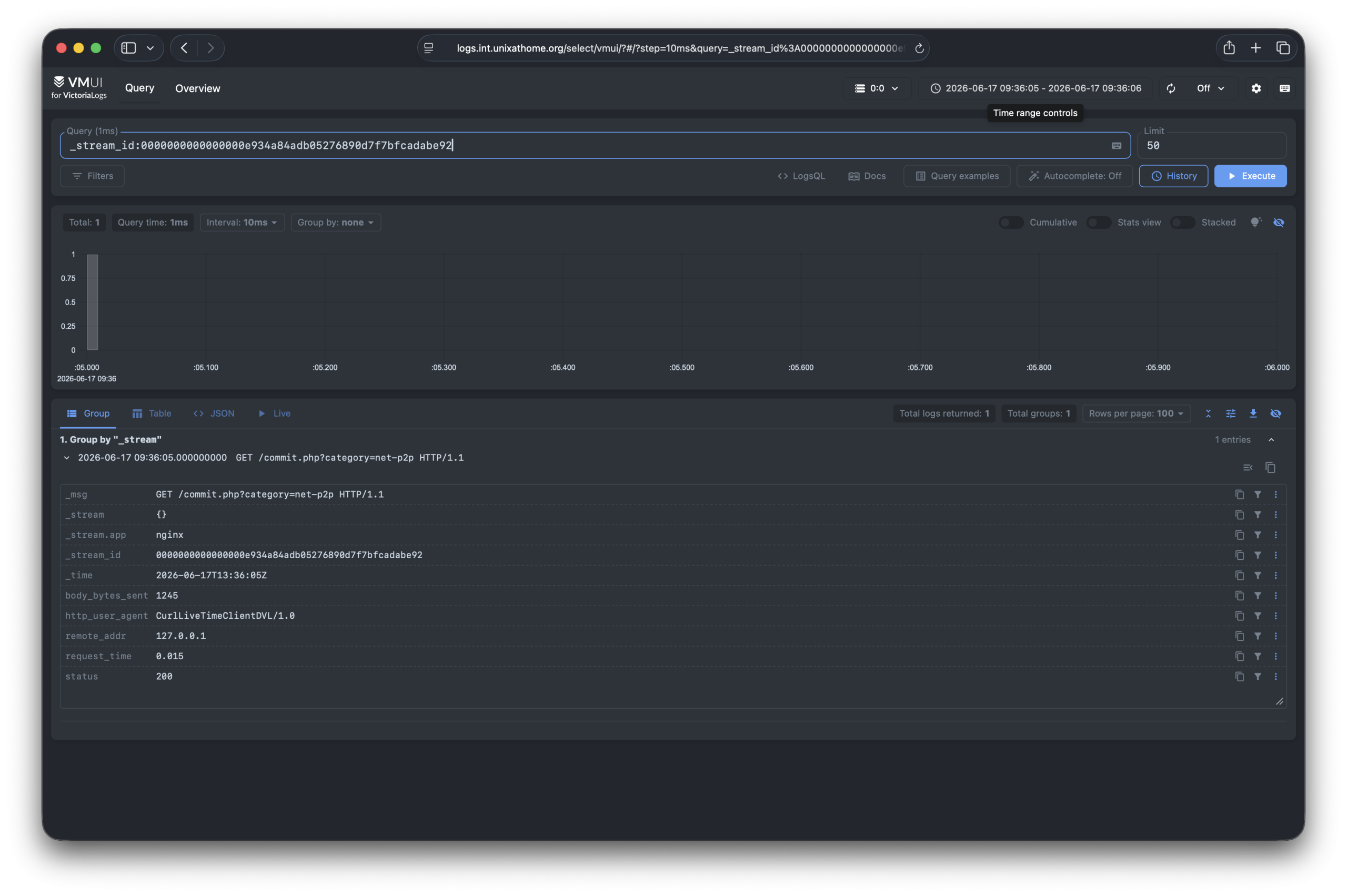
That is a sample post which gave me this within the Victoria-Logs UI:
{
  "_msg": "GET /commit.php?category=net-p2p HTTP/1.1",
  "_stream": "{}",
  "_stream.app": "nginx",
  "_stream_id": "0000000000000000e934a84adb05276890d7f7bfcadabe92",
  "_time": "2026-06-17T13:36:05Z",
  "body_bytes_sent": "1245",
  "http_user_agent": "CurlLiveTimeClientDVL/1.0",
  "remote_addr": "127.0.0.1",
  "request_time": "0.015",
  "status": "200"
}
Which seems accurate.
The UI looks like this:
Now, let’s convert that into something syslog-ng can use.
Getting raw metrics
This section is just FYI.
At one point, the debugging led me to running this query. Over time, I could see that none of these metrics were changing. That helped me to confirm that data wasn’t getting there. Something else was wrong.
[14:08 logs dvl ~] % curl -ks "https://logs.int.unixathome.org/metrics" | grep vl_rows
vl_rows_dropped_total{reason="debug"} 0
vl_rows_dropped_total{reason="too_many_fields"} 0
vl_rows_ingested_total{type="elasticsearch_bulk"} 1
vl_rows_ingested_total{type="jsonline"} 6922
vl_rows_ingested_total{type="syslog_tcp"} 52692
vl_rows_merged_total{type="storage/inmemory"} 5808
vl_rows_merged_total{type="storage/small"} 202451
vl_rows_merged_total{type="storage/big"} 0
vl_rows_merged_total{type="indexdb/inmemory"} 8417
vl_rows_merged_total{type="indexdb/file"} 35921
vl_rows_dropped_total{reason="too_big_timestamp"} 0
vl_rows_dropped_total{reason="too_small_timestamp"} 0
Nginx configuration
This is the configuration on the nginx instance which will be sending logs to Victoria-Logs.
# this define the format Nginx will save to disk.

log_format victorialogs_json escape=json '{'
    '"_time":"$time_iso8601",'
    '"_msg":"$request",'
    '"status":"$status",'
    '"remote_addr":"$remote_addr",'
    '"body_bytes_sent":"$body_bytes_sent",'
    '"request_time":"$request_time",'
    '"http_user_agent":"$http_user_agent",'
    '"_stream.app":"nginx",'
    '"http_referer":"$http_referer",'
    '"request_method":"$request_method"'
'}';

# the above goes outside the vhost definition.
# the following goes inside the vhost

  # the regular logs, already in place
  error_log     /var/log/nginx/freshports.org-error.log;
  access_log    /var/log/nginx/freshports.org-access.log combined;

  # the addition, which syslog-ng will read
  access_log /var/log/nginx/access_json.log victorialogs_json;
syslog-ng config
This is the syslog-ng config:
source s_nginx_json {
    file("/var/log/nginx/access_json.log" flags(no-parse));
};

destination d_victorialogs_json {
    http(
        url("https://logs.int.unixathome.org:9428/insert/jsonline")
        method("POST")

        headers("Content-Type: application/x-ndjson")
        body("{\"_msg\":\"${.json._msg}\",\"_time\":\"${.json._time}\",\"_stream.app\":\"nginx\",\"status\":\"${.json.status}\",\"remote_addr\":\"${.json.remote_addr}\",\"body_bytes_sent\":\"${.json.body_bytes_sent}\",\"http_user_agent\":\"${.json.http_user_agent}\",\"request_time\":\"${.json.request_time}\",\"request_method\":\"${.json.request_method}\"}\n")

        tls(
            peer-verify(yes)
        )

        # LOG LOSS PROTECTION:
        disk-buffer(
            disk-buf-size(1073741824)        # 1 GB max buffer storage size
            reliable(yes)                    # Synchronous disk writes protect against power loss
        )
        workers(2)
    );
};

log {
    source(s_nginx_json);
    parser(p_json);
    destination(d_victorialogs_json);
};
In short, syslog-ng is tailing the log, which is already in JSON, then pulling fields out, and putting them into the fields which Victoria-Logs expect. The data is transmitted via https.
General syslog configuration
For the general syslog messages, not just nginx, these are my settings.
These are the settings I added to /etc/rc.conf so Victoria-Logs will present an incoming TLS connection. Again, this was all on one line.
-syslog.listenAddr.tcp=:29514 -syslog.tls=true \
-syslog.tlsCertFile=/usr/local/etc/ssl/logs.int.unixathome.org.fullchain.cer \
-syslog.tlsKeyFile=/usr/local/etc/ssl/logs.int.unixathome.org.key
On the dev.freshports.org server sending syslog messages to Victoria-Logs, I added these entries to /usr/local/etc/syslog-ng.conf:
destination d_victorialogs_syslog {
    syslog("logs.int.unixathome.org"
        port(29514)
        transport("tls")
        tls(
            # Path to the FreeBSD master trust store we verified earlier
            ca-file("/usr/local/share/certs/ca-root-nss.crt")
            # Enforce peer validation using the trusted certs
            peer-verify(yes)
        )
    );
};


# Log path linking your sources to VictoriaLogs
log {
    source(src);
    destination(d_victorialogs_syslog);
};
Verifying the TLS
This was the tcpdump command I was using to verify nothing was in clear-text:
[21:05 r730-01 dvl ~] % sudo tcpdump -Ani lo0 host 10.55.0.39 and port 29514


